Add SDK Dependency

Add the Facebetter dependency to your project’s Podfile:
Run the installation command:
Xcode 15+ Compilation Error HandlingIf you are using Xcode 15 or later, you might encounter a Sandbox: rsync.samba deny(1) error during compilation. This is caused by Xcode’s default User Script Sandboxing being enabled.Solution:
  1. Select your Project in Xcode.
  2. Navigate to the Build Settings tab.
  3. Search for ENABLE_USER_SCRIPT_SANDBOXING.
  4. Change its value from Yes to No.

Method B: Manual Framework Integration

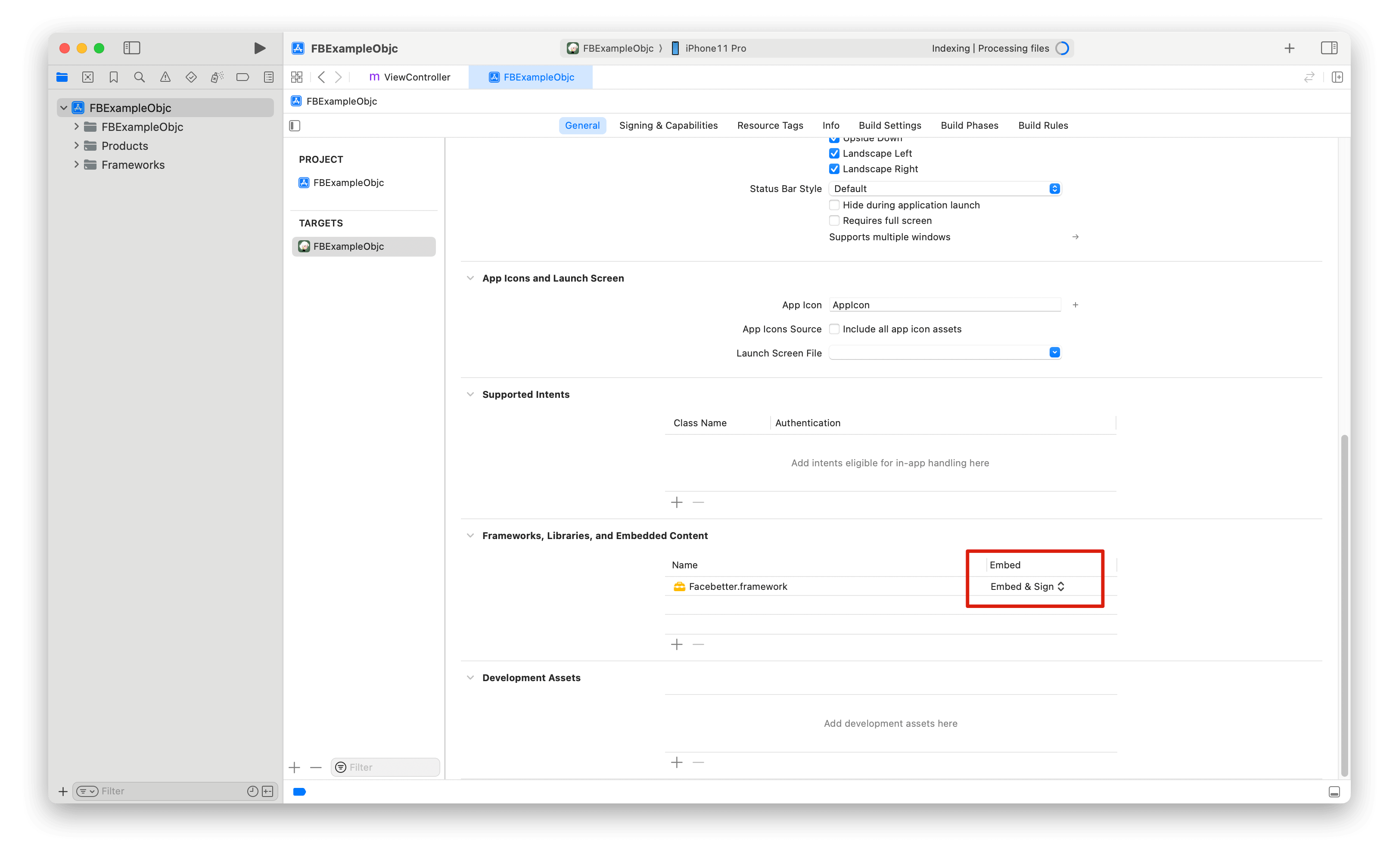
Go to the Download page to get the latest SDK, then extract it. Copy the Facebetter.framework library from the SDK package to your project path. Open Xcode and refer to this guide to add the Facebetter.framework dynamic library. Make sure the Embed property of the added dynamic library is set to Embed & Sign.

Permission Configuration

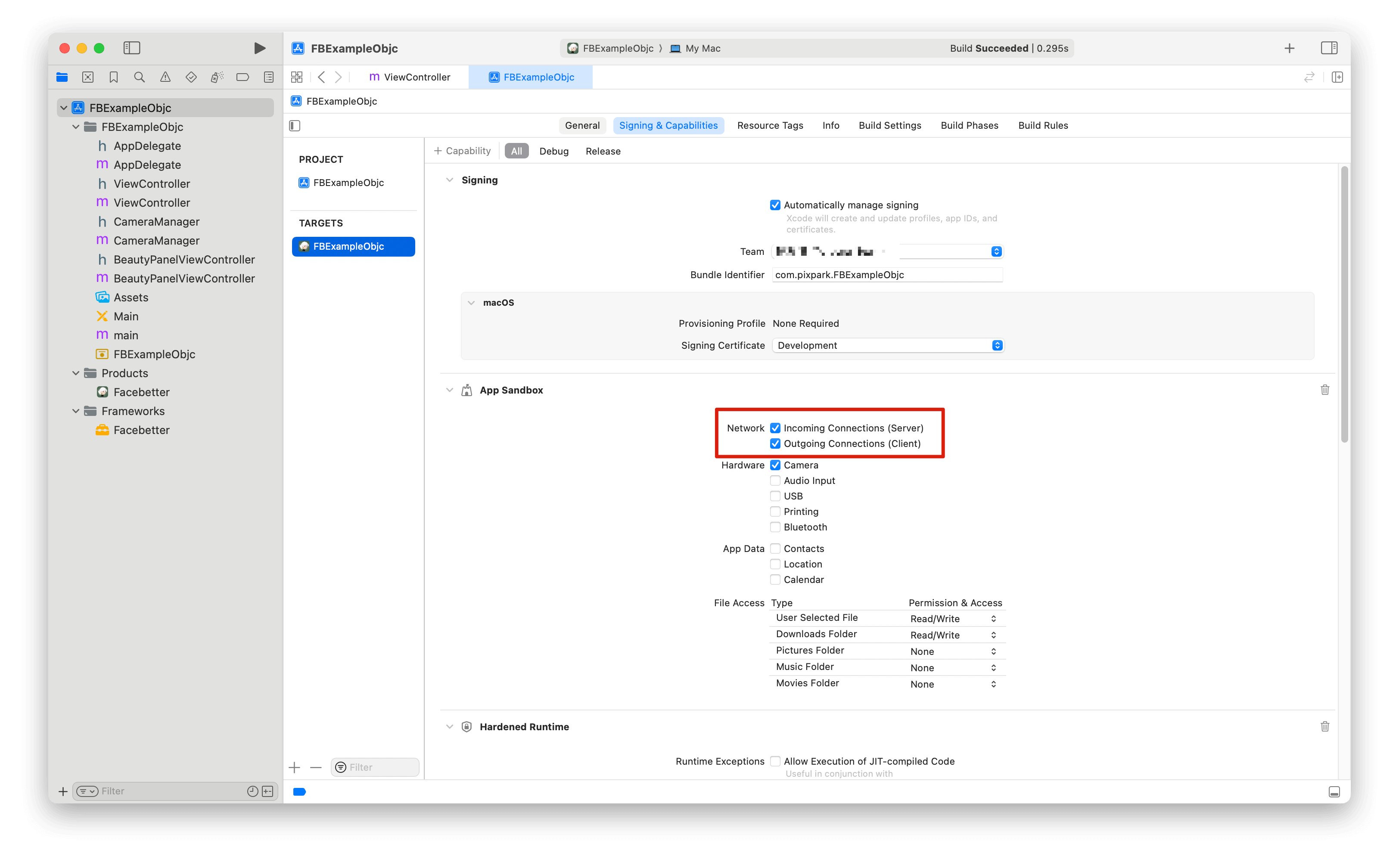
Ensure network permissions are enabled for appkey validation
Permission Descriptions:
  • Network Permission: Required. SDK needs network connection to verify appId and appKey to ensure the app runs normally.

Import Header Files

Log Configuration

Logging is disabled by default and can be enabled as needed. Both console logging and file logging switches are supported.
Logging should be enabled before creating the beauty engine, otherwise you may not see initialization logs.

Create Configuration Engine

Follow the instructions on this page to get your appid and appkey. Verification Priority:
  • If licenseJson is provided, use license data verification (supports online response and offline license)
  • Otherwise, use appId and appKey for automatic online verification

Error Handling

After creating the engine, it’s recommended to check if it was successful:

Using Filters and Stickers

Filters and stickers need to be registered as resource files (.fbd) first, and then set via their ID.

Filters

Stickers

Adjust Beauty Parameters

All beauty parameters range from [0.0, 1.0]. Set to 0 to disable the effect.

Set Skin Beauty Parameters

Use the setBasicParam interface to set skin beauty parameters. Parameter range [0.0, 1.0].
Supported skin beauty parameters:

Set Skin-Only Beauty

Use the setSkinOnlyBeauty: interface to set whether beauty effects are applied only to skin regions. When enabled, beauty effects (smoothing, whitening, etc.) will only be applied to detected skin areas, leaving non-skin areas unchanged.
After enabling skin-only beauty, even with high beauty parameter values, non-skin areas (such as background, clothing, etc.) will not be affected.

Set Face Reshape Parameters

Use the setReshapeParam interface to set face reshape parameters. Parameter range [0.0, 1.0].
Supported face reshape parameters:

Set Makeup Parameters

Supported makeup parameters:

Set Virtual Background

Enable virtual background through the setVirtualBackground interface:

Set Engine Callbacks

Monitor engine events (license validation and engine initialization status):
Event codes:
  • FBEngineEventCodeLicenseValidationSuccess (0): License validation succeeded
  • FBEngineEventCodeLicenseValidationFailed (1): License validation failed
  • FBEngineEventCodeInitializationComplete (100): Engine initialization completed
  • FBEngineEventCodeInitializationFailed (101): Engine initialization failed

Process Images

Create Images

Image data is encapsulated through FBImageFrame, supporting formats: YUVI420, NV12, NV21, RGB, RGBA, BGR, BGRA. Create FBImageFrame with RGBA
Create FBImageFrame with image file

Rotate Images

FBImageFrame has built-in image rotation methods that can be used as needed.
Rotation angles

Process Images

processMode includes Video and Image modes. Video mode is suitable for live streaming and video scenarios with higher efficiency. Image mode is suitable for image processing scenarios.
The engine automatically maintains input/output format consistency. If input is RGBA format, output is RGBA format; if input is I420 format, output is I420 format.

Get Processed Image Data

Get I420 data
FBImageFrame can be converted to various formats through built-in toXXX methods: YUVI420, NV12, NV21, RGB, RGBA, BGR, BGRA. These methods can be used for format conversion.

Lifecycle Management

FBBeautyEffectEngine is a singleton and is automatically released when the app ends. Manual management is not required.

Release Resources

When ViewController is destroyed, be sure to release engine resources:

Memory Management

  • Release FBImageFrame and FBImageBuffer objects timely
  • Avoid repeatedly creating large numbers of image objects in loops
  • Recommend reusing FBImageFrame objects