> ## Documentation Index
> Fetch the complete documentation index at: https://docs.facebetter.net/llms.txt
> Use this file to discover all available pages before exploring further.
# Implementar beleza
> Implemente beleza no macOS com o Facebetter SDK 2.0
Esta página corresponde ao SDK **2.0.0**. Autenticação: [Autenticação e licença](/pt-BR/intro/license). Enums de maquiagem / remodelagem: [Enums de parâmetros](/pt-BR/intro/makeup).
## Adicionar a dependência do SDK
### Método A: CocoaPods (recomendado)
```ruby theme={null}
target 'YourTargetName' do
pod 'Facebetter', '2.0.0'
end
```
```bash theme={null}
pod install
```
**Erro de compilação no Xcode 15+**
Se você usa **Xcode 15** ou posterior, pode encontrar o erro `Sandbox: rsync.samba deny(1)`. Isso é causado pelo **User Script Sandboxing**.
**Solução:**
1. Selecione o **Project** no Xcode.
2. Abra **Build Settings**.
3. Pesquise `ENABLE_USER_SCRIPT_SANDBOXING`.
4. Altere o valor de `Yes` para **`No`**.
### Método B: Framework manual
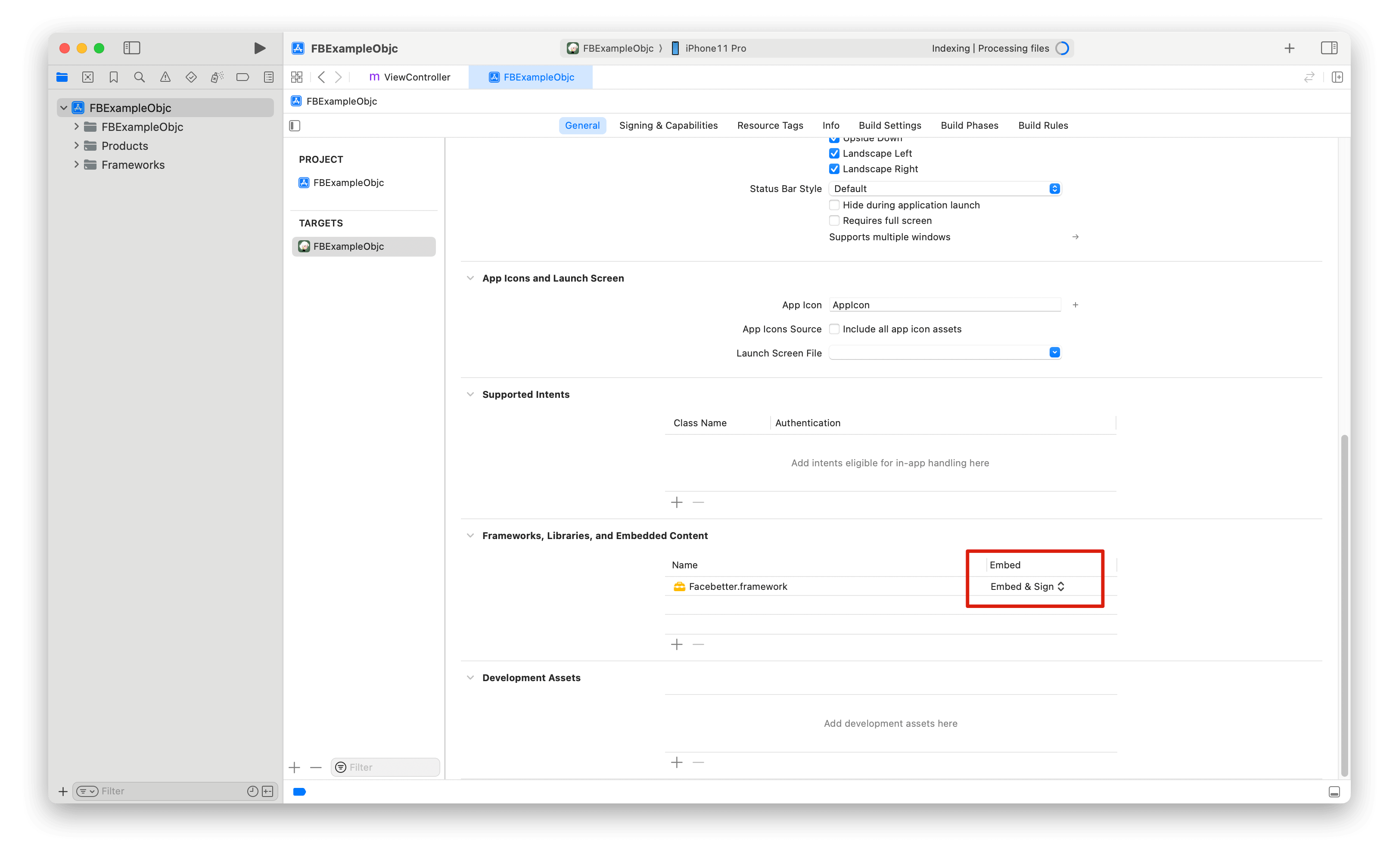
Baixe o SDK em [Downloads](https://facebetter.net/pt-BR/download), copie `Facebetter.framework` para o projeto e [incorpore a biblioteca dinâmica](https://help.apple.com/xcode/mac/current/#/dev51a648b07) com **Embed & Sign**.
 ### Permissões
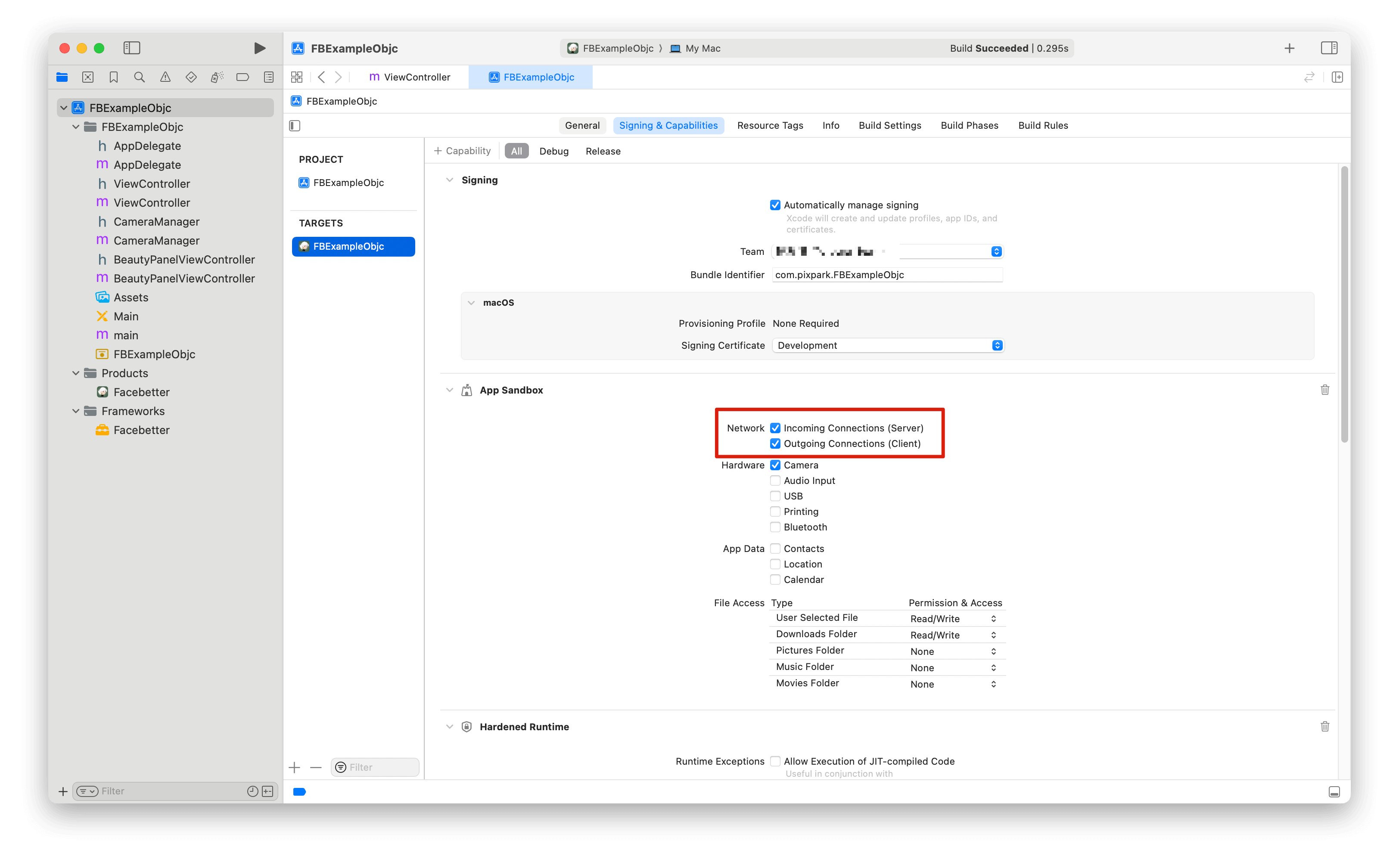
Apps Mac no sandbox que usam `appId` / `appKey` online precisam permitir rede de saída:
### Permissões
Apps Mac no sandbox que usam `appId` / `appKey` online precisam permitir rede de saída:
 Câmera (opcional): `NSCameraUsageDescription` no `Info.plist`.
## Import
```objc theme={null}
#import
```
Tipos AppKit (`NSImage`) exigem `#import ` (geralmente via prefix header ou o header do mecanismo no macOS).
## Configuração de log
O logging vem desligado por padrão. Chame `setLogConfig:` **antes** de criar o mecanismo.
```objc theme={null}
FBLogConfig *logConfig = [[FBLogConfig alloc] init];
logConfig.level = FBLogLevel_Info;
logConfig.consoleEnabled = YES;
logConfig.fileEnabled = YES;
logConfig.fileName = @"/path/in/container/facebetter.log";
[FBBeautyEffectEngine setLogConfig:logConfig];
```
## Criar o mecanismo
Vincule o Bundle ID do macOS e, em seguida, passe `licenseToken` ou `appId` + `appKey`. Veja [Obter AppID e AppKey](/pt-BR/intro/enable-service#get-appid-and-appkey) e [Autenticação e licença](/pt-BR/intro/license).
**Prioridade:** se `licenseToken` não estiver vazio (string do token de licença, JSON `{token}` ou conteúdo de `.lic`), o SDK o valida localmente. Caso contrário, usa `appId` + `appKey` contra `/facebetter/v2/auth`.
```objc theme={null}
FBEngineConfig *engineConfig = [[FBEngineConfig alloc] init];
engineConfig.appId = @"your appId";
engineConfig.appKey = @"your appKey";
// engineConfig.licenseToken = @"your license token";
engineConfig.externalContext = NO;
self.beautyEffectEngine = [FBBeautyEffectEngine createEngineWithConfig:engineConfig];
if (self.beautyEffectEngine == nil) {
NSLog(@"Failed to create beauty engine");
return;
}
```
`createEngineWithConfig:` retorna uma **instância**, não um singleton. Para ferramentas de linha de comando sem Bundle ID, vincule o nome do processo no Console.
## Beleza da pele
A intensidade costuma ser `[0.0, 1.0]`. Enums de estilo: [Enums de parâmetros](/pt-BR/intro/makeup).
```objc theme={null}
[self.beautyEffectEngine setSmoothing:0.5f];
[self.beautyEffectEngine setSmoothingStyle:FBSmoothingStyle_Natural];
[self.beautyEffectEngine setWhitening:0.3f];
[self.beautyEffectEngine setWhiteningStyle:FBWhiteningStyle_ColdWhite];
[self.beautyEffectEngine setSharpening:0.2f];
[self.beautyEffectEngine setRosiness:0.15f];
[self.beautyEffectEngine setBeautySkinOnly:YES];
```
## Remodelagem facial
A faixa de `setReshape:intensity:` é **`[-1.0, 1.0]`**. `0` desliga. Parâmetros: `FBReshape_FaceThin` … `FBReshape_BrowThickness` (`0`–`25`). Significados: [Enums de parâmetros](/pt-BR/intro/makeup).
```objc theme={null}
[self.beautyEffectEngine setReshape:FBReshape_FaceThin intensity:0.4f];
[self.beautyEffectEngine setReshape:FBReshape_EyeSize intensity:0.2f];
```
## Remodelagem corporal
A faixa de `setBodyReshape:intensity:` é **`[0.0, 1.0]`**. `0` desliga. Registre `resource_body.fbd` com `addResourcePack:` primeiro. Parâmetros: `FBBodyReshape_BodySlim` … `FBBodyReshape_TorsoLong` (`0`–`8`). Veja [Enums de parâmetros](/pt-BR/intro/makeup) e [Pacotes de recursos opcionais](/pt-BR/intro/resource-packs).
```objc theme={null}
NSString *bodyPack = [[NSBundle mainBundle] pathForResource:@"resource_body" ofType:@"fbd"];
[self.beautyEffectEngine addResourcePack:bodyPack];
[self.beautyEffectEngine setBodyReshape:FBBodyReshape_WaistSlim intensity:0.4f];
[self.beautyEffectEngine setBodyReshape:FBBodyReshape_LegStretch intensity:0.3f];
[self.beautyEffectEngine setBodyReshape:FBBodyReshape_TorsoLong intensity:0.3f];
```
## Maquiagem
Intensidade, formato e cor são chamadas separadas. Predefinições completas: [Enums de parâmetros](/pt-BR/intro/makeup).
```objc theme={null}
[self.beautyEffectEngine setLipstick:0.5f];
[self.beautyEffectEngine setLipstickColor:FBLipstickColor_Rouge];
[self.beautyEffectEngine setBlush:0.4f];
[self.beautyEffectEngine setBlushStyle:FBBlushStyle_SunKissed];
[self.beautyEffectEngine setBlushColor:FBBlushColor_CoralPink];
[self.beautyEffectEngine setContour:0.35f];
[self.beautyEffectEngine setContourStyle:FBContourStyle_Natural];
[self.beautyEffectEngine setEyeShadow:0.4f];
[self.beautyEffectEngine setEyeShadowStyle:FBEyeShadowStyle_Soft];
[self.beautyEffectEngine setEyeShadowColor:FBEyeShadowColor_Plum];
[self.beautyEffectEngine setEyeLiner:0.4f];
[self.beautyEffectEngine setEyeLinerStyle:FBEyeLinerStyle_Classic];
[self.beautyEffectEngine setEyeLinerColor:FBEyeLinerColor_Coffee];
[self.beautyEffectEngine setEyebrow:0.4f];
[self.beautyEffectEngine setEyebrowStyle:FBEyebrowStyle_Natural];
[self.beautyEffectEngine setEyebrowColor:FBEyebrowColor_DarkBrown];
[self.beautyEffectEngine setEyelash:0.4f];
[self.beautyEffectEngine setEyelashStyle:FBEyelashStyle_Classic];
[self.beautyEffectEngine setEyelashColor:FBEyelashColor_Black];
[self.beautyEffectEngine setPupil:0.4f];
[self.beautyEffectEngine setPupilColor:FBPupilColor_Hazel];
```
## Fundo virtual
```objc theme={null}
[self.beautyEffectEngine setVirtualBackgroundBlur:0.6f];
[self.beautyEffectEngine setVirtualBackground:imagePath];
[self.beautyEffectEngine setVirtualBackgroundWithData:pngOrJpegData];
[self.beautyEffectEngine clearVirtualBackground];
```
O chroma key substitui apenas a máscara. O preenchimento continua sendo desfoque ou a imagem de substituição.
```objc theme={null}
[self.beautyEffectEngine setChromaKey:FBChromaKeyColor_Green];
[self.beautyEffectEngine setChromaKeySimilarity:0.4f];
[self.beautyEffectEngine setChromaKeySmoothness:0.3f];
[self.beautyEffectEngine setChromaKeyDesaturation:0.2f];
[self.beautyEffectEngine clearChromaKey];
```
## Filtros e adesivos
Passe um caminho de arquivo `.fbd` ou bytes em memória.
```objc theme={null}
NSString *filterPath = [[NSBundle mainBundle] pathForResource:@"chuxin" ofType:@"fbd"];
[self.beautyEffectEngine setFilter:filterPath];
[self.beautyEffectEngine setFilterIntensity:0.8f];
[self.beautyEffectEngine clearFilter];
[self.beautyEffectEngine setFilterWithData:filterData];
NSString *stickerPath = [[NSBundle mainBundle] pathForResource:@"cherry" ofType:@"fbd"];
[self.beautyEffectEngine setSticker:stickerPath];
[self.beautyEffectEngine clearSticker];
[self.beautyEffectEngine setStickerWithData:stickerData];
```
Adesivos 3D precisam do pacote opcional `resource_3d.fbd` (não está no framework). Veja [Pacotes de recursos opcionais](/pt-BR/intro/resource-packs):
```objc theme={null}
NSString *packPath = [[NSBundle mainBundle] pathForResource:@"resource_3d" ofType:@"fbd"];
[self.beautyEffectEngine addResourcePack:packPath];
NSString *sticker3dPath = [[NSBundle mainBundle] pathForResource:@"oculos" ofType:@"fbd"];
[self.beautyEffectEngine set3DSticker:sticker3dPath];
[self.beautyEffectEngine clear3DSticker];
```
## Callbacks e estatísticas
```objc theme={null}
FBEngineCallbacks *callbacks = [[FBEngineCallbacks alloc] init];
callbacks.onEngineEvent = ^(FBEngineEventCode code, NSString * _Nullable message) {
// 0 license OK, 1 license fail, 100 init complete, 101 init fail
NSLog(@"engine event %ld %@", (long)code, message);
};
callbacks.onFaceLandmarks = ^(NSArray * _Nullable results) {
NSLog(@"faces %lu", (unsigned long)results.count);
};
[self.beautyEffectEngine setCallbacks:callbacks];
FBEngineStats *stats = [self.beautyEffectEngine getStats];
NSLog(@"fps=%.1f avg=%.2fms session=%.1fs",
stats.fps, stats.avgProcessTimeMs, stats.sessionTimeS);
```
## Processar imagens
`FBImageFrame` suporta I420, NV12, NV21, RGB, RGBA, BGR, BGRA, arquivo, textura e **`NSImage`**.
```objc theme={null}
FBImageFrame *fromFile = [FBImageFrame createWithFile:@"/path/photo.png"];
FBImageFrame *fromRGBA = [FBImageFrame createWithRGBA:data width:width height:height stride:stride];
FBImageFrame *fromNSImage = [FBImageFrame createWithNSImage:nsImage];
```
Defina `type` e, em seguida, chame `processImage:` (sem argumento extra de modo). A saída mantém o formato de entrada.
```objc theme={null}
input.type = FBFrameTypeVideo; // or FBFrameTypeImage
FBImageFrame *output = [self.beautyEffectEngine processImage:input];
```
`FBFrameTypeVideo` é para streams ao vivo; `FBFrameTypeImage` é para stills e `NSImage`.
```objc theme={null}
[input rotate:FBImageRotation90];
[input setMirror:@"horizontal"];
FBImageFrame *rgba = [output convert:FBImageFormatRGBA];
const uint8_t *bytes = [rgba data];
[output toFile:@"/path/out.jpg" quality:90];
```
Planos YUV: `dataY`, `dataU`, `dataV`, `dataUV` e strides correspondentes.
## Textura externa
Crie o mecanismo no thread OpenGL e defina `externalContext = YES`. As texturas de entrada e saída precisam compartilhar esse contexto.
```objc theme={null}
FBEngineConfig *config = [[FBEngineConfig alloc] init];
config.appId = @"your appId";
config.appKey = @"your appKey";
config.externalContext = YES;
self.engine = [FBBeautyEffectEngine createEngineWithConfig:config];
FBImageFrame *inputFrame = [FBImageFrame createWithTexture:textureId
width:width
height:height
stride:width * 4];
inputFrame.type = FBFrameTypeVideo;
FBImageFrame *outputFrame = [self.engine processImage:inputFrame];
GLuint outputTexture = [outputFrame texture];
```
Para TRTC / Agora / LiveKit: [Integração com terceiros](/pt-BR/macos/third-party-integration).
## Ciclo de vida
Mantenha uma referência strong no `NSViewController`. Pare a sessão de captura quando a view desaparecer ou a janela for miniaturizada. Atribua nil ao mecanismo quando a sessão terminar.
```objc theme={null}
- (void)dealloc {
self.beautyEffectEngine = nil;
}
```
## Relacionado
* [Integração com terceiros](/pt-BR/macos/third-party-integration)
* [Práticas recomendadas](/pt-BR/macos/best-practices)
* [Tratamento de erros](/pt-BR/macos/error-handling)
* [Perguntas frequentes](/pt-BR/macos/faq)
* [Referência da API](/pt-BR/macos/api-reference)
Câmera (opcional): `NSCameraUsageDescription` no `Info.plist`.
## Import
```objc theme={null}
#import
```
Tipos AppKit (`NSImage`) exigem `#import ` (geralmente via prefix header ou o header do mecanismo no macOS).
## Configuração de log
O logging vem desligado por padrão. Chame `setLogConfig:` **antes** de criar o mecanismo.
```objc theme={null}
FBLogConfig *logConfig = [[FBLogConfig alloc] init];
logConfig.level = FBLogLevel_Info;
logConfig.consoleEnabled = YES;
logConfig.fileEnabled = YES;
logConfig.fileName = @"/path/in/container/facebetter.log";
[FBBeautyEffectEngine setLogConfig:logConfig];
```
## Criar o mecanismo
Vincule o Bundle ID do macOS e, em seguida, passe `licenseToken` ou `appId` + `appKey`. Veja [Obter AppID e AppKey](/pt-BR/intro/enable-service#get-appid-and-appkey) e [Autenticação e licença](/pt-BR/intro/license).
**Prioridade:** se `licenseToken` não estiver vazio (string do token de licença, JSON `{token}` ou conteúdo de `.lic`), o SDK o valida localmente. Caso contrário, usa `appId` + `appKey` contra `/facebetter/v2/auth`.
```objc theme={null}
FBEngineConfig *engineConfig = [[FBEngineConfig alloc] init];
engineConfig.appId = @"your appId";
engineConfig.appKey = @"your appKey";
// engineConfig.licenseToken = @"your license token";
engineConfig.externalContext = NO;
self.beautyEffectEngine = [FBBeautyEffectEngine createEngineWithConfig:engineConfig];
if (self.beautyEffectEngine == nil) {
NSLog(@"Failed to create beauty engine");
return;
}
```
`createEngineWithConfig:` retorna uma **instância**, não um singleton. Para ferramentas de linha de comando sem Bundle ID, vincule o nome do processo no Console.
## Beleza da pele
A intensidade costuma ser `[0.0, 1.0]`. Enums de estilo: [Enums de parâmetros](/pt-BR/intro/makeup).
```objc theme={null}
[self.beautyEffectEngine setSmoothing:0.5f];
[self.beautyEffectEngine setSmoothingStyle:FBSmoothingStyle_Natural];
[self.beautyEffectEngine setWhitening:0.3f];
[self.beautyEffectEngine setWhiteningStyle:FBWhiteningStyle_ColdWhite];
[self.beautyEffectEngine setSharpening:0.2f];
[self.beautyEffectEngine setRosiness:0.15f];
[self.beautyEffectEngine setBeautySkinOnly:YES];
```
## Remodelagem facial
A faixa de `setReshape:intensity:` é **`[-1.0, 1.0]`**. `0` desliga. Parâmetros: `FBReshape_FaceThin` … `FBReshape_BrowThickness` (`0`–`25`). Significados: [Enums de parâmetros](/pt-BR/intro/makeup).
```objc theme={null}
[self.beautyEffectEngine setReshape:FBReshape_FaceThin intensity:0.4f];
[self.beautyEffectEngine setReshape:FBReshape_EyeSize intensity:0.2f];
```
## Remodelagem corporal
A faixa de `setBodyReshape:intensity:` é **`[0.0, 1.0]`**. `0` desliga. Registre `resource_body.fbd` com `addResourcePack:` primeiro. Parâmetros: `FBBodyReshape_BodySlim` … `FBBodyReshape_TorsoLong` (`0`–`8`). Veja [Enums de parâmetros](/pt-BR/intro/makeup) e [Pacotes de recursos opcionais](/pt-BR/intro/resource-packs).
```objc theme={null}
NSString *bodyPack = [[NSBundle mainBundle] pathForResource:@"resource_body" ofType:@"fbd"];
[self.beautyEffectEngine addResourcePack:bodyPack];
[self.beautyEffectEngine setBodyReshape:FBBodyReshape_WaistSlim intensity:0.4f];
[self.beautyEffectEngine setBodyReshape:FBBodyReshape_LegStretch intensity:0.3f];
[self.beautyEffectEngine setBodyReshape:FBBodyReshape_TorsoLong intensity:0.3f];
```
## Maquiagem
Intensidade, formato e cor são chamadas separadas. Predefinições completas: [Enums de parâmetros](/pt-BR/intro/makeup).
```objc theme={null}
[self.beautyEffectEngine setLipstick:0.5f];
[self.beautyEffectEngine setLipstickColor:FBLipstickColor_Rouge];
[self.beautyEffectEngine setBlush:0.4f];
[self.beautyEffectEngine setBlushStyle:FBBlushStyle_SunKissed];
[self.beautyEffectEngine setBlushColor:FBBlushColor_CoralPink];
[self.beautyEffectEngine setContour:0.35f];
[self.beautyEffectEngine setContourStyle:FBContourStyle_Natural];
[self.beautyEffectEngine setEyeShadow:0.4f];
[self.beautyEffectEngine setEyeShadowStyle:FBEyeShadowStyle_Soft];
[self.beautyEffectEngine setEyeShadowColor:FBEyeShadowColor_Plum];
[self.beautyEffectEngine setEyeLiner:0.4f];
[self.beautyEffectEngine setEyeLinerStyle:FBEyeLinerStyle_Classic];
[self.beautyEffectEngine setEyeLinerColor:FBEyeLinerColor_Coffee];
[self.beautyEffectEngine setEyebrow:0.4f];
[self.beautyEffectEngine setEyebrowStyle:FBEyebrowStyle_Natural];
[self.beautyEffectEngine setEyebrowColor:FBEyebrowColor_DarkBrown];
[self.beautyEffectEngine setEyelash:0.4f];
[self.beautyEffectEngine setEyelashStyle:FBEyelashStyle_Classic];
[self.beautyEffectEngine setEyelashColor:FBEyelashColor_Black];
[self.beautyEffectEngine setPupil:0.4f];
[self.beautyEffectEngine setPupilColor:FBPupilColor_Hazel];
```
## Fundo virtual
```objc theme={null}
[self.beautyEffectEngine setVirtualBackgroundBlur:0.6f];
[self.beautyEffectEngine setVirtualBackground:imagePath];
[self.beautyEffectEngine setVirtualBackgroundWithData:pngOrJpegData];
[self.beautyEffectEngine clearVirtualBackground];
```
O chroma key substitui apenas a máscara. O preenchimento continua sendo desfoque ou a imagem de substituição.
```objc theme={null}
[self.beautyEffectEngine setChromaKey:FBChromaKeyColor_Green];
[self.beautyEffectEngine setChromaKeySimilarity:0.4f];
[self.beautyEffectEngine setChromaKeySmoothness:0.3f];
[self.beautyEffectEngine setChromaKeyDesaturation:0.2f];
[self.beautyEffectEngine clearChromaKey];
```
## Filtros e adesivos
Passe um caminho de arquivo `.fbd` ou bytes em memória.
```objc theme={null}
NSString *filterPath = [[NSBundle mainBundle] pathForResource:@"chuxin" ofType:@"fbd"];
[self.beautyEffectEngine setFilter:filterPath];
[self.beautyEffectEngine setFilterIntensity:0.8f];
[self.beautyEffectEngine clearFilter];
[self.beautyEffectEngine setFilterWithData:filterData];
NSString *stickerPath = [[NSBundle mainBundle] pathForResource:@"cherry" ofType:@"fbd"];
[self.beautyEffectEngine setSticker:stickerPath];
[self.beautyEffectEngine clearSticker];
[self.beautyEffectEngine setStickerWithData:stickerData];
```
Adesivos 3D precisam do pacote opcional `resource_3d.fbd` (não está no framework). Veja [Pacotes de recursos opcionais](/pt-BR/intro/resource-packs):
```objc theme={null}
NSString *packPath = [[NSBundle mainBundle] pathForResource:@"resource_3d" ofType:@"fbd"];
[self.beautyEffectEngine addResourcePack:packPath];
NSString *sticker3dPath = [[NSBundle mainBundle] pathForResource:@"oculos" ofType:@"fbd"];
[self.beautyEffectEngine set3DSticker:sticker3dPath];
[self.beautyEffectEngine clear3DSticker];
```
## Callbacks e estatísticas
```objc theme={null}
FBEngineCallbacks *callbacks = [[FBEngineCallbacks alloc] init];
callbacks.onEngineEvent = ^(FBEngineEventCode code, NSString * _Nullable message) {
// 0 license OK, 1 license fail, 100 init complete, 101 init fail
NSLog(@"engine event %ld %@", (long)code, message);
};
callbacks.onFaceLandmarks = ^(NSArray * _Nullable results) {
NSLog(@"faces %lu", (unsigned long)results.count);
};
[self.beautyEffectEngine setCallbacks:callbacks];
FBEngineStats *stats = [self.beautyEffectEngine getStats];
NSLog(@"fps=%.1f avg=%.2fms session=%.1fs",
stats.fps, stats.avgProcessTimeMs, stats.sessionTimeS);
```
## Processar imagens
`FBImageFrame` suporta I420, NV12, NV21, RGB, RGBA, BGR, BGRA, arquivo, textura e **`NSImage`**.
```objc theme={null}
FBImageFrame *fromFile = [FBImageFrame createWithFile:@"/path/photo.png"];
FBImageFrame *fromRGBA = [FBImageFrame createWithRGBA:data width:width height:height stride:stride];
FBImageFrame *fromNSImage = [FBImageFrame createWithNSImage:nsImage];
```
Defina `type` e, em seguida, chame `processImage:` (sem argumento extra de modo). A saída mantém o formato de entrada.
```objc theme={null}
input.type = FBFrameTypeVideo; // or FBFrameTypeImage
FBImageFrame *output = [self.beautyEffectEngine processImage:input];
```
`FBFrameTypeVideo` é para streams ao vivo; `FBFrameTypeImage` é para stills e `NSImage`.
```objc theme={null}
[input rotate:FBImageRotation90];
[input setMirror:@"horizontal"];
FBImageFrame *rgba = [output convert:FBImageFormatRGBA];
const uint8_t *bytes = [rgba data];
[output toFile:@"/path/out.jpg" quality:90];
```
Planos YUV: `dataY`, `dataU`, `dataV`, `dataUV` e strides correspondentes.
## Textura externa
Crie o mecanismo no thread OpenGL e defina `externalContext = YES`. As texturas de entrada e saída precisam compartilhar esse contexto.
```objc theme={null}
FBEngineConfig *config = [[FBEngineConfig alloc] init];
config.appId = @"your appId";
config.appKey = @"your appKey";
config.externalContext = YES;
self.engine = [FBBeautyEffectEngine createEngineWithConfig:config];
FBImageFrame *inputFrame = [FBImageFrame createWithTexture:textureId
width:width
height:height
stride:width * 4];
inputFrame.type = FBFrameTypeVideo;
FBImageFrame *outputFrame = [self.engine processImage:inputFrame];
GLuint outputTexture = [outputFrame texture];
```
Para TRTC / Agora / LiveKit: [Integração com terceiros](/pt-BR/macos/third-party-integration).
## Ciclo de vida
Mantenha uma referência strong no `NSViewController`. Pare a sessão de captura quando a view desaparecer ou a janela for miniaturizada. Atribua nil ao mecanismo quando a sessão terminar.
```objc theme={null}
- (void)dealloc {
self.beautyEffectEngine = nil;
}
```
## Relacionado
* [Integração com terceiros](/pt-BR/macos/third-party-integration)
* [Práticas recomendadas](/pt-BR/macos/best-practices)
* [Tratamento de erros](/pt-BR/macos/error-handling)
* [Perguntas frequentes](/pt-BR/macos/faq)
* [Referência da API](/pt-BR/macos/api-reference)