> ## Documentation Index
> Fetch the complete documentation index at: https://docs.facebetter.net/llms.txt
> Use this file to discover all available pages before exploring further.
# Adjust effects
> Adjust skin, face shape, makeup, stickers, and background in the Facebetter panel.
After the filter is on a source, adjust it in the panel on the right. The OBS preview follows the sliders. Streaming and recording send the processed picture. If you have not added the filter yet, start with [Sign in and add the filter](/obs/login).
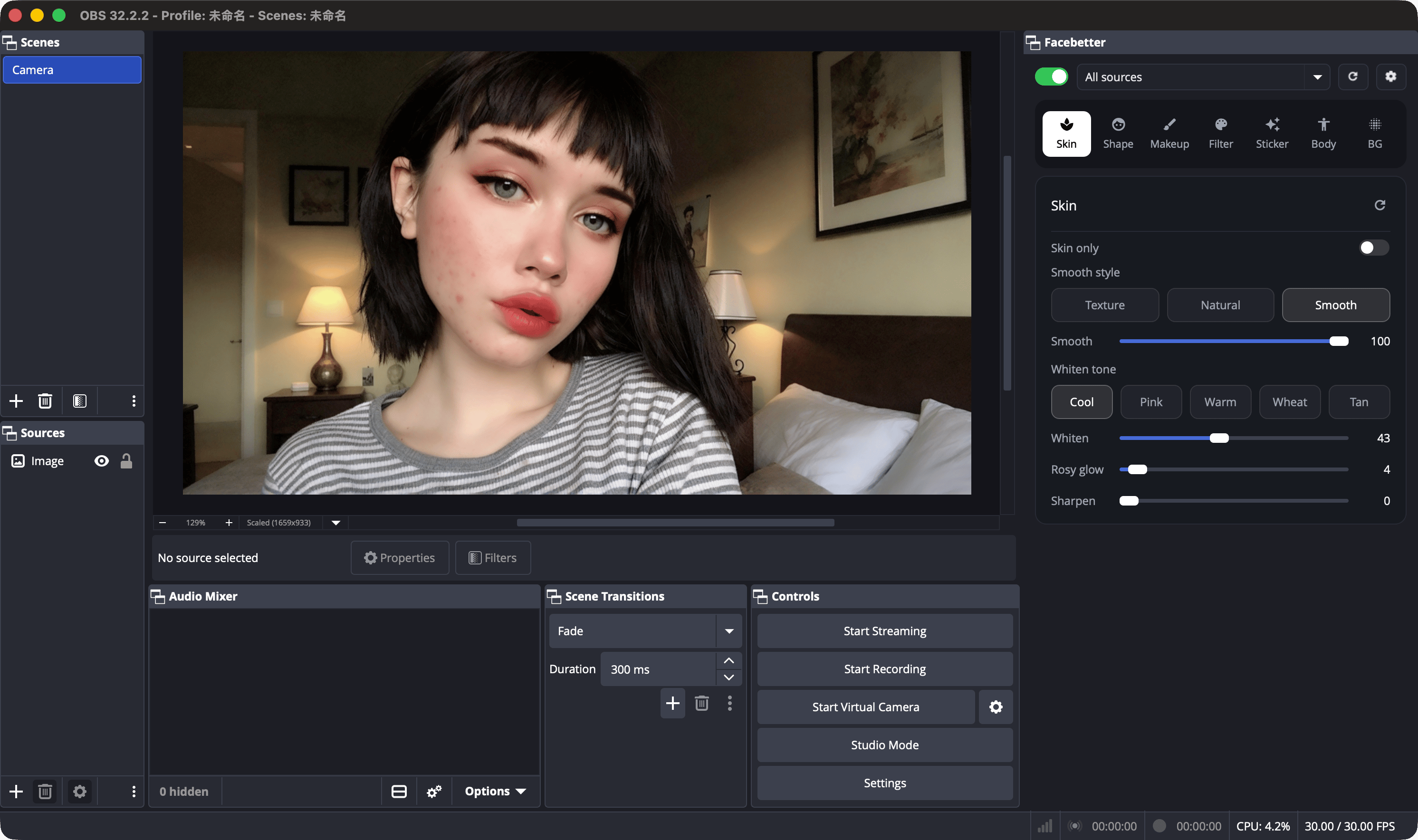 Across the top of the panel, from left to right:
* **Switch**: compare on and off. Off shows the original preview. Turn it back on before you go live.
* **Source menu**: one source that already has the filter, or **All sources**. All sources writes the change onto every Facebetter filter.
* **Reset**: return the current page to its defaults.
* **Gear**: settings. Choose whether the panel opens when OBS starts, and open the account and subscription page.
Under that are seven pages:
| Page | What it does |
| - | - |
| Skin | Smooth, whiten, rosy glow, and sharpen. **Skin only** limits the effect to skin, so clothes, the background, and a product in frame stay as they are. Smooth styles are Texture, Natural, and Smooth. Whiten tones are Cool, Pink, Warm, Wheat, and Tan. |
| Shape | Face, forehead and brows, eyes, nose, and mouth. Each control moves both ways. 0 means unchanged. |
| Makeup | Lipstick, blush, contour, eyeshadow, eyeliner, brows, lashes, and lenses. Style, shade, and intensity are separate. |
| Filter | Film color. Pick a LUT, then set the amount. None turns color grading off. |
| Sticker | 2D face tracking, 2D screen stickers, and 3D stickers. None removes the sticker. |
| Body | Slim the body, waist, legs, shoulders, and arms, lengthen the legs, and adjust the bust. This suits a half-body or full-body shot. |
| BG | Keep the original background, blur it, or replace it with a preset. Cutout can use portrait segmentation, or a green, blue, or red screen. |
The panel language follows OBS. Simplified Chinese, Traditional Chinese, English, Japanese, Korean, Portuguese, Spanish, and German have their own interface. Other OBS languages show English.
## Remove the watermark
The free plan includes every effect above, and the output has a watermark. Pro removes the watermark and can be used on 2 devices.
* Monthly: \$8.99
* Yearly: \$69
Click **Remove watermark** at the top of the panel, or open the gear → Account and subscribe on the page. Dismissing the banner lasts only until you quit OBS. Subscribe and manage devices at [facebetter.net/dashboard/obs](https://facebetter.net/dashboard/obs).
This documentation is built and hosted on [Mintlify](https://mintlify.com), a developer documentation platform.
Across the top of the panel, from left to right:
* **Switch**: compare on and off. Off shows the original preview. Turn it back on before you go live.
* **Source menu**: one source that already has the filter, or **All sources**. All sources writes the change onto every Facebetter filter.
* **Reset**: return the current page to its defaults.
* **Gear**: settings. Choose whether the panel opens when OBS starts, and open the account and subscription page.
Under that are seven pages:
| Page | What it does |
| - | - |
| Skin | Smooth, whiten, rosy glow, and sharpen. **Skin only** limits the effect to skin, so clothes, the background, and a product in frame stay as they are. Smooth styles are Texture, Natural, and Smooth. Whiten tones are Cool, Pink, Warm, Wheat, and Tan. |
| Shape | Face, forehead and brows, eyes, nose, and mouth. Each control moves both ways. 0 means unchanged. |
| Makeup | Lipstick, blush, contour, eyeshadow, eyeliner, brows, lashes, and lenses. Style, shade, and intensity are separate. |
| Filter | Film color. Pick a LUT, then set the amount. None turns color grading off. |
| Sticker | 2D face tracking, 2D screen stickers, and 3D stickers. None removes the sticker. |
| Body | Slim the body, waist, legs, shoulders, and arms, lengthen the legs, and adjust the bust. This suits a half-body or full-body shot. |
| BG | Keep the original background, blur it, or replace it with a preset. Cutout can use portrait segmentation, or a green, blue, or red screen. |
The panel language follows OBS. Simplified Chinese, Traditional Chinese, English, Japanese, Korean, Portuguese, Spanish, and German have their own interface. Other OBS languages show English.
## Remove the watermark
The free plan includes every effect above, and the output has a watermark. Pro removes the watermark and can be used on 2 devices.
* Monthly: \$8.99
* Yearly: \$69
Click **Remove watermark** at the top of the panel, or open the gear → Account and subscribe on the page. Dismissing the banner lasts only until you quit OBS. Subscribe and manage devices at [facebetter.net/dashboard/obs](https://facebetter.net/dashboard/obs).
This documentation is built and hosted on [Mintlify](https://mintlify.com), a developer documentation platform.