> ## Documentation Index
> Fetch the complete documentation index at: https://docs.facebetter.net/llms.txt
> Use this file to discover all available pages before exploring further.
# Implement Beauty
> Implement macOS Beauty
## Add SDK Dependency
### Method A: CocoaPods Integration (Recommended)
Add the `Facebetter` dependency to your project's `Podfile`:
```ruby theme={null}
target 'YourTargetName' do
# Please replace with the latest version
pod 'Facebetter', '1.2.2'
end
```
Run the installation command:
```bash theme={null}
pod install
```
**Xcode 15+ Compilation Error Handling**
If you are using **Xcode 15** or later, you might encounter a `Sandbox: rsync.samba deny(1)` error during compilation. This is caused by Xcode's default **User Script Sandboxing** being enabled.
**Solution:**
1. Select your **Project** in Xcode.
2. Navigate to the **Build Settings** tab.
3. Search for `ENABLE_USER_SCRIPT_SANDBOXING`.
4. Change its value from `Yes` to **`No`**.
### Method B: Manual Framework Integration
Go to the [Download](https://facebetter.net/download) page to get the latest SDK, then extract it.
Copy the `Facebetter.framework` library from the SDK package to your project path.
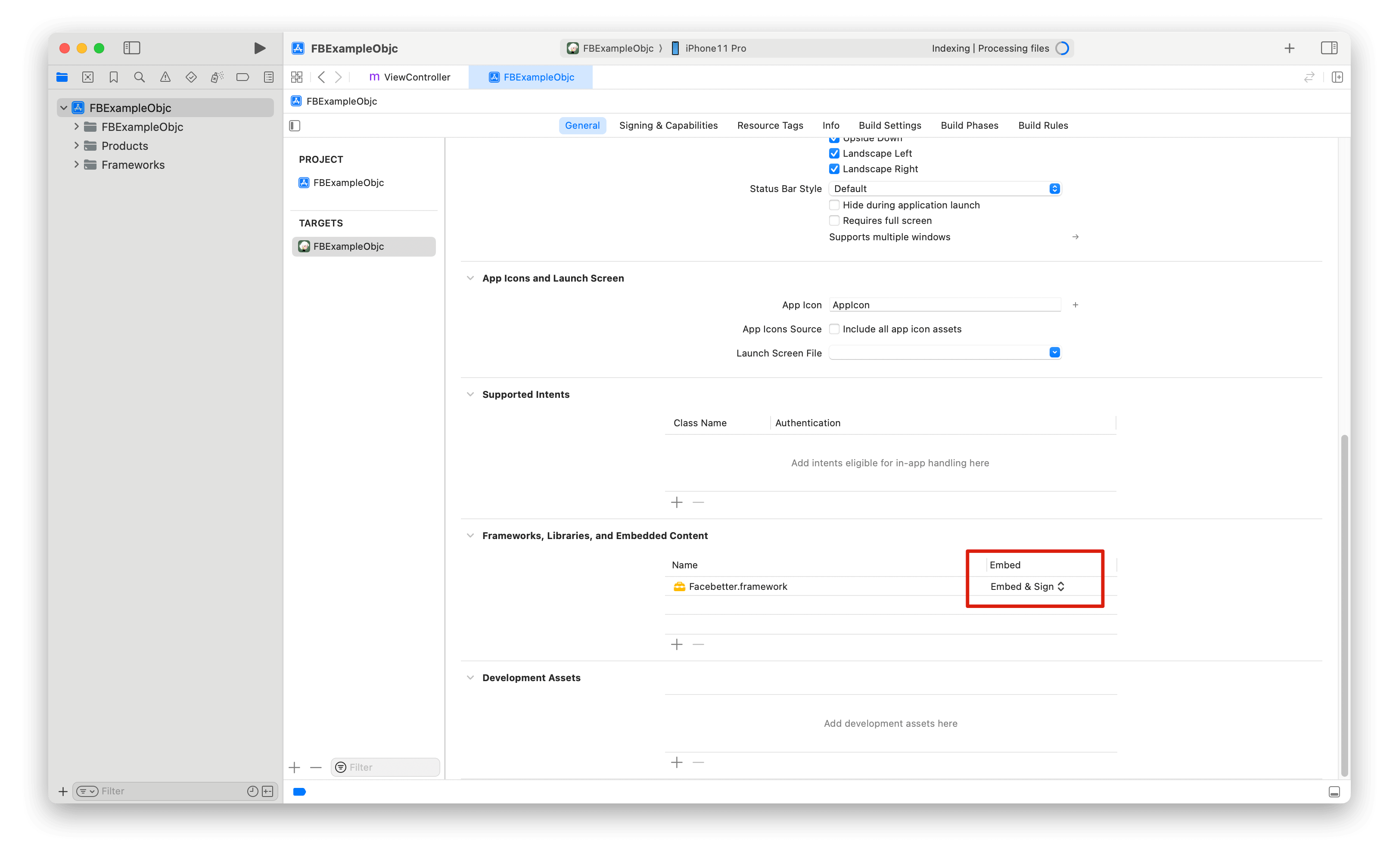
Open Xcode and [refer to this guide](https://help.apple.com/xcode/mac/current/#/dev51a648b07) to add the `Facebetter.framework` dynamic library. Make sure the **Embed** property of the added dynamic library is set to **Embed & Sign**.
 ### Permission Configuration
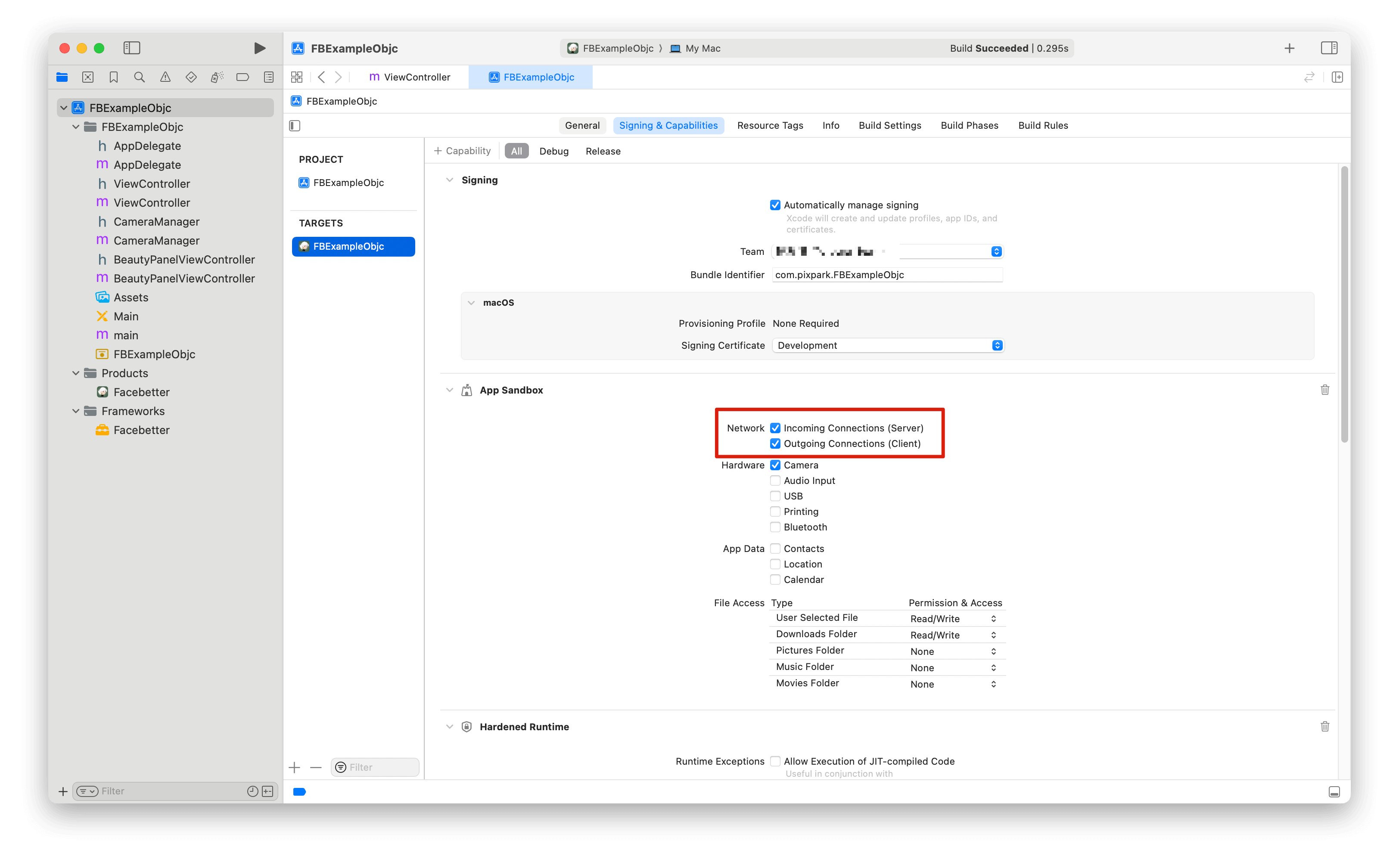
Ensure network permissions are enabled for appkey validation
### Permission Configuration
Ensure network permissions are enabled for appkey validation
 **Permission Descriptions:**
* **Network Permission**: Required. SDK needs network connection to verify `appId` and `appKey` to ensure the app runs normally.
## Import Header Files
```objc theme={null}
#import
```
## Log Configuration
Logging is disabled by default and can be enabled as needed. Both console logging and file logging switches are supported.
Logging should be enabled **before** creating the beauty engine, otherwise you may not see initialization logs.
```objc theme={null}
FBLogConfig* logConfig = [[FBLogConfig alloc] init];
// Log level
logConfig.level = FBLogLevel_Info;
// Console logging
logConfig.consoleEnabled = YES;
// File logging
logConfig.fileEnabled = YES;
logConfig.fileName = @"log path: xx/xx/facebetter.log";
```
## Create Configuration Engine
Follow the instructions on [this page](/intro/enable-service#get-appid-and-appkey) to get your `appid` and `appkey`.
**Verification Priority:**
* If `licenseJson` is provided, use license data verification (supports online response and offline license)
* Otherwise, use `appId` and `appKey` for automatic online verification
```objc{2,3,4} theme={null}
FBEngineConfig *engineConfig = [[FBEngineConfig alloc] init];
engineConfig.appId = @"your appId"; // Configure your appid (optional, not required if licenseJson is provided)
engineConfig.appKey = @"your appkey"; // Configure your appkey (optional, not required if licenseJson is provided)
// Optional: Use license data verification (takes priority if provided)
// engineConfig.licenseJson = @"your license json string";
self.beautyEffectEngine = [FBBeautyEffectEngine createEngineWithConfig:engineConfig];
```
### Error Handling
After creating the engine, it's recommended to check if it was successful:
```objc theme={null}
if (self.beautyEffectEngine == nil) {
NSLog(@"Failed to create beauty engine");
return;
}
```
## Using Filters and Stickers
Filters and stickers need to be registered as resource files (`.fbd`) first, and then set via their `ID`.
### Filters
```objc theme={null}
// 1. Register filter resource (usually executed once after initialization)
NSString *filterId = @"chuxin";
NSString *fbdPath = [[NSBundle mainBundle] pathForResource:@"chuxin" ofType:@"fbd"];
[self.beautyEffectEngine registerFilter:filterId fbdFilePath:fbdPath];
// 2. Set filter
[self.beautyEffectEngine setFilter:filterId];
// 3. Adjust intensity (0.0 - 1.0)
[self.beautyEffectEngine setFilterIntensity:0.8f];
// 4. Clear filter
[self.beautyEffectEngine setFilter:nil];
```
### Stickers
```objc theme={null}
// 1. Register sticker resource
NSString *stickerId = @"glasses";
NSString *fbdPath = [[NSBundle mainBundle] pathForResource:@"glasses" ofType:@"fbd"];
[self.beautyEffectEngine registerSticker:stickerId fbdFilePath:fbdPath];
// 2. Set sticker
[self.beautyEffectEngine setSticker:stickerId];
// 3. Clear sticker
[self.beautyEffectEngine setSticker:nil];
```
## Adjust Beauty Parameters
All beauty parameters range from `[0.0, 1.0]`. Set to `0` to disable the effect.
### Set Skin Beauty Parameters
Use the `setBasicParam` interface to set skin beauty parameters. **Parameter range \[0.0, 1.0]**.
```objc theme={null}
[self.beautyEffectEngine setBasicParam:FBBasicParam_Smoothing floatValue:0.5f];
```
Supported skin beauty parameters:
```objc theme={null}
typedef NS_ENUM(NSInteger, FBBasicParam) {
FBBasicParam_Smoothing = 0, // Smoothing
FBBasicParam_Sharpening, // Sharpening
FBBasicParam_Whitening, // Whitening
FBBasicParam_Rosiness, // Rosiness
};
```
### Set Skin-Only Beauty
Use the `setSkinOnlyBeauty:` interface to set whether beauty effects are applied only to skin regions. When enabled, beauty effects (smoothing, whitening, etc.) will only be applied to detected skin areas, leaving non-skin areas unchanged.
```objc theme={null}
// Enable skin-only beauty
[self.beautyEffectEngine setSkinOnlyBeauty:YES];
// Disable skin-only beauty (apply to entire image)
[self.beautyEffectEngine setSkinOnlyBeauty:NO];
```
After enabling skin-only beauty, even with high beauty parameter values, non-skin areas (such as background, clothing, etc.) will not be affected.
### Set Face Reshape Parameters
Use the `setReshapeParam` interface to set face reshape parameters. **Parameter range \[0.0, 1.0]**.
```objc theme={null}
[self.beautyEffectEngine setReshapeParam:FBReshapeParam_FaceThin floatValue:0.5f];
```
Supported face reshape parameters:
```objc theme={null}
typedef NS_ENUM(NSInteger, FBReshapeParam) {
FBReshapeParam_FaceThin = 0, // Face thinning
FBReshapeParam_FaceVShape, // V-shaped face
FBReshapeParam_FaceNarrow, // Narrow face
FBReshapeParam_FaceShort, // Short face
FBReshapeParam_Cheekbone, // Cheekbone
FBReshapeParam_Jawbone, // Jawbone
FBReshapeParam_Chin, // Chin
FBReshapeParam_NoseSlim, // Nose slimming
FBReshapeParam_EyeSize, // Eye enlargement
FBReshapeParam_EyeDistance, // Eye distance
};
```
### Set Makeup Parameters
```objc theme={null}
[self.beautyEffectEngine setMakeupParam:FBMakeupParam_Lipstick floatValue:0.5f];
```
Supported makeup parameters:
```objc theme={null}
typedef NS_ENUM(NSInteger, FBMakeupParam) {
FBMakeupParam_Lipstick = 0, // Lipstick
FBMakeupParam_Blush, // Blush
};
```
### Set Virtual Background
Enable virtual background through the `setVirtualBackground` interface:
```objc theme={null}
// Set background mode
FBVirtualBackgroundOptions *options = [[FBVirtualBackgroundOptions alloc] initWithMode:FBBackgroundModeBlur];
[self.beautyEffectEngine setVirtualBackground:options];
// Set background image (need to set to Image mode first)
FBVirtualBackgroundOptions *imageOptions = [[FBVirtualBackgroundOptions alloc] initWithMode:FBBackgroundModeImage];
imageOptions.backgroundImage = backgroundImageFrame; // FBImageFrame object
[self.beautyEffectEngine setVirtualBackground:imageOptions];
```
## Set Engine Callbacks
Monitor engine events (license validation and engine initialization status):
```objc theme={null}
FBEngineCallbacks *callbacks = [[FBEngineCallbacks alloc] init];
callbacks.onEngineEvent = ^(FBEngineEventCode code, NSString* _Nullable message) {
if (code == FBEngineEventCodeLicenseValidationSuccess) {
// License validation succeeded
NSLog(@"License validation succeeded");
} else if (code == FBEngineEventCodeLicenseValidationFailed) {
// License validation failed
NSLog(@"License validation failed: %@", message);
} else if (code == FBEngineEventCodeInitializationComplete) {
// Engine initialization completed
NSLog(@"Engine initialization completed");
} else if (code == FBEngineEventCodeInitializationFailed) {
// Engine initialization failed
NSLog(@"Engine initialization failed: %@", message);
}
};
[self.beautyEffectEngine setCallbacks:callbacks];
```
Event codes:
* `FBEngineEventCodeLicenseValidationSuccess` (0): License validation succeeded
* `FBEngineEventCodeLicenseValidationFailed` (1): License validation failed
* `FBEngineEventCodeInitializationComplete` (100): Engine initialization completed
* `FBEngineEventCodeInitializationFailed` (101): Engine initialization failed
## Process Images
### Create Images
Image data is encapsulated through `FBImageFrame`, supporting formats: `YUVI420`, `NV12`, `NV21`, `RGB`, `RGBA`, `BGR`, `BGRA`.
**Create FBImageFrame with RGBA**
```objc theme={null}
FBImageFrame *input_image = [FBImageFrame createWithRGBA:data width:width height:height stride:stride];
```
**Create FBImageFrame with image file**
```objc theme={null}
FBImageFrame *input_image = [FBImageFrame createWithFile:@"xxx.png"];
```
### Rotate Images
FBImageFrame has built-in image rotation methods that can be used as needed.
```objc theme={null}
- (int)rotate:(FBImageRotation)rotation;
```
Rotation angles
```objc theme={null}
typedef NS_ENUM(NSInteger, FBImageRotation) {
FBImageRotation0, // 0 degrees
FBImageRotation90, // Clockwise 90 degrees
FBImageRotation180, // Clockwise 180 degrees
FBImageRotation270, // Clockwise 270 degrees
};
```
### Process Images
`processMode` includes Video and Image modes. Video mode is suitable for live streaming and video scenarios with higher efficiency. Image mode is suitable for image processing scenarios.
```objc theme={null}
input_image.type = FBFrameTypeVideo;
FBImageFrame *output_image = [self.beautyEffectEngine processImage:input_image];
```
The engine automatically maintains input/output format consistency. If input is RGBA format, output is RGBA format; if input is I420 format, output is I420 format.
### Get Processed Image Data
```objc theme={null}
FBImageBuffer* buffer = [output_image toRGBA];
uint8_t* data = [buffer data];
int data_size = buffer.size;
int width = buffer.width;
int height = buffer.width;
int stride = buffer.stride;
```
Get I420 data
```objc theme={null}
FBImageBuffer* buffer = [output_image toI420];
// Get continuous I420 memory data
uint8_t* data = [buffer data];
// Get I420 data length
int data_size = buffer.size;
// Get Y, U, V component data separately
uint8_t* dataY = [buffer dataY];
uint8_t* dataU = [buffer dataU];
uint8_t* dataV = [buffer dataV];
int strideY = buffer.strideY;
int strideU = buffer.strideU;
int strideV = buffer.strideV;
```
`FBImageFrame` can be converted to various formats through built-in toXXX methods: `YUVI420`, `NV12`, `NV21`, `RGB`, `RGBA`, `BGR`, `BGRA`. These methods can be used for format conversion.
## Lifecycle Management
FBBeautyEffectEngine is a singleton and is automatically released when the app ends. Manual management is not required.
### Release Resources
When ViewController is destroyed, be sure to release engine resources:
```objc theme={null}
- (void)dealloc {
if (self.beautyEffectEngine) {
// Note: FBBeautyEffectEngine is a singleton, usually doesn't need manual release
// But if there are custom cleanup logic, it can be handled here
self.beautyEffectEngine = nil;
}
}
```
### Memory Management
* Release `FBImageFrame` and `FBImageBuffer` objects timely
* Avoid repeatedly creating large numbers of image objects in loops
* Recommend reusing `FBImageFrame` objects
```objc theme={null}
// Release resources after use
if (inputImage) {
inputImage = nil; // ARC will automatically release
}
if (outputImage) {
outputImage = nil; // ARC will automatically release
}
if (buffer) {
buffer = nil; // ARC will automatically release
}
```
## Related Documentation
* [Best Practices](/macos/best-practices) - Performance optimization and architecture design recommendations
* [Common Issues](/macos/faq) - Common questions and troubleshooting
* [API Reference](/macos/api-reference) - Complete API documentation
**Permission Descriptions:**
* **Network Permission**: Required. SDK needs network connection to verify `appId` and `appKey` to ensure the app runs normally.
## Import Header Files
```objc theme={null}
#import
```
## Log Configuration
Logging is disabled by default and can be enabled as needed. Both console logging and file logging switches are supported.
Logging should be enabled **before** creating the beauty engine, otherwise you may not see initialization logs.
```objc theme={null}
FBLogConfig* logConfig = [[FBLogConfig alloc] init];
// Log level
logConfig.level = FBLogLevel_Info;
// Console logging
logConfig.consoleEnabled = YES;
// File logging
logConfig.fileEnabled = YES;
logConfig.fileName = @"log path: xx/xx/facebetter.log";
```
## Create Configuration Engine
Follow the instructions on [this page](/intro/enable-service#get-appid-and-appkey) to get your `appid` and `appkey`.
**Verification Priority:**
* If `licenseJson` is provided, use license data verification (supports online response and offline license)
* Otherwise, use `appId` and `appKey` for automatic online verification
```objc{2,3,4} theme={null}
FBEngineConfig *engineConfig = [[FBEngineConfig alloc] init];
engineConfig.appId = @"your appId"; // Configure your appid (optional, not required if licenseJson is provided)
engineConfig.appKey = @"your appkey"; // Configure your appkey (optional, not required if licenseJson is provided)
// Optional: Use license data verification (takes priority if provided)
// engineConfig.licenseJson = @"your license json string";
self.beautyEffectEngine = [FBBeautyEffectEngine createEngineWithConfig:engineConfig];
```
### Error Handling
After creating the engine, it's recommended to check if it was successful:
```objc theme={null}
if (self.beautyEffectEngine == nil) {
NSLog(@"Failed to create beauty engine");
return;
}
```
## Using Filters and Stickers
Filters and stickers need to be registered as resource files (`.fbd`) first, and then set via their `ID`.
### Filters
```objc theme={null}
// 1. Register filter resource (usually executed once after initialization)
NSString *filterId = @"chuxin";
NSString *fbdPath = [[NSBundle mainBundle] pathForResource:@"chuxin" ofType:@"fbd"];
[self.beautyEffectEngine registerFilter:filterId fbdFilePath:fbdPath];
// 2. Set filter
[self.beautyEffectEngine setFilter:filterId];
// 3. Adjust intensity (0.0 - 1.0)
[self.beautyEffectEngine setFilterIntensity:0.8f];
// 4. Clear filter
[self.beautyEffectEngine setFilter:nil];
```
### Stickers
```objc theme={null}
// 1. Register sticker resource
NSString *stickerId = @"glasses";
NSString *fbdPath = [[NSBundle mainBundle] pathForResource:@"glasses" ofType:@"fbd"];
[self.beautyEffectEngine registerSticker:stickerId fbdFilePath:fbdPath];
// 2. Set sticker
[self.beautyEffectEngine setSticker:stickerId];
// 3. Clear sticker
[self.beautyEffectEngine setSticker:nil];
```
## Adjust Beauty Parameters
All beauty parameters range from `[0.0, 1.0]`. Set to `0` to disable the effect.
### Set Skin Beauty Parameters
Use the `setBasicParam` interface to set skin beauty parameters. **Parameter range \[0.0, 1.0]**.
```objc theme={null}
[self.beautyEffectEngine setBasicParam:FBBasicParam_Smoothing floatValue:0.5f];
```
Supported skin beauty parameters:
```objc theme={null}
typedef NS_ENUM(NSInteger, FBBasicParam) {
FBBasicParam_Smoothing = 0, // Smoothing
FBBasicParam_Sharpening, // Sharpening
FBBasicParam_Whitening, // Whitening
FBBasicParam_Rosiness, // Rosiness
};
```
### Set Skin-Only Beauty
Use the `setSkinOnlyBeauty:` interface to set whether beauty effects are applied only to skin regions. When enabled, beauty effects (smoothing, whitening, etc.) will only be applied to detected skin areas, leaving non-skin areas unchanged.
```objc theme={null}
// Enable skin-only beauty
[self.beautyEffectEngine setSkinOnlyBeauty:YES];
// Disable skin-only beauty (apply to entire image)
[self.beautyEffectEngine setSkinOnlyBeauty:NO];
```
After enabling skin-only beauty, even with high beauty parameter values, non-skin areas (such as background, clothing, etc.) will not be affected.
### Set Face Reshape Parameters
Use the `setReshapeParam` interface to set face reshape parameters. **Parameter range \[0.0, 1.0]**.
```objc theme={null}
[self.beautyEffectEngine setReshapeParam:FBReshapeParam_FaceThin floatValue:0.5f];
```
Supported face reshape parameters:
```objc theme={null}
typedef NS_ENUM(NSInteger, FBReshapeParam) {
FBReshapeParam_FaceThin = 0, // Face thinning
FBReshapeParam_FaceVShape, // V-shaped face
FBReshapeParam_FaceNarrow, // Narrow face
FBReshapeParam_FaceShort, // Short face
FBReshapeParam_Cheekbone, // Cheekbone
FBReshapeParam_Jawbone, // Jawbone
FBReshapeParam_Chin, // Chin
FBReshapeParam_NoseSlim, // Nose slimming
FBReshapeParam_EyeSize, // Eye enlargement
FBReshapeParam_EyeDistance, // Eye distance
};
```
### Set Makeup Parameters
```objc theme={null}
[self.beautyEffectEngine setMakeupParam:FBMakeupParam_Lipstick floatValue:0.5f];
```
Supported makeup parameters:
```objc theme={null}
typedef NS_ENUM(NSInteger, FBMakeupParam) {
FBMakeupParam_Lipstick = 0, // Lipstick
FBMakeupParam_Blush, // Blush
};
```
### Set Virtual Background
Enable virtual background through the `setVirtualBackground` interface:
```objc theme={null}
// Set background mode
FBVirtualBackgroundOptions *options = [[FBVirtualBackgroundOptions alloc] initWithMode:FBBackgroundModeBlur];
[self.beautyEffectEngine setVirtualBackground:options];
// Set background image (need to set to Image mode first)
FBVirtualBackgroundOptions *imageOptions = [[FBVirtualBackgroundOptions alloc] initWithMode:FBBackgroundModeImage];
imageOptions.backgroundImage = backgroundImageFrame; // FBImageFrame object
[self.beautyEffectEngine setVirtualBackground:imageOptions];
```
## Set Engine Callbacks
Monitor engine events (license validation and engine initialization status):
```objc theme={null}
FBEngineCallbacks *callbacks = [[FBEngineCallbacks alloc] init];
callbacks.onEngineEvent = ^(FBEngineEventCode code, NSString* _Nullable message) {
if (code == FBEngineEventCodeLicenseValidationSuccess) {
// License validation succeeded
NSLog(@"License validation succeeded");
} else if (code == FBEngineEventCodeLicenseValidationFailed) {
// License validation failed
NSLog(@"License validation failed: %@", message);
} else if (code == FBEngineEventCodeInitializationComplete) {
// Engine initialization completed
NSLog(@"Engine initialization completed");
} else if (code == FBEngineEventCodeInitializationFailed) {
// Engine initialization failed
NSLog(@"Engine initialization failed: %@", message);
}
};
[self.beautyEffectEngine setCallbacks:callbacks];
```
Event codes:
* `FBEngineEventCodeLicenseValidationSuccess` (0): License validation succeeded
* `FBEngineEventCodeLicenseValidationFailed` (1): License validation failed
* `FBEngineEventCodeInitializationComplete` (100): Engine initialization completed
* `FBEngineEventCodeInitializationFailed` (101): Engine initialization failed
## Process Images
### Create Images
Image data is encapsulated through `FBImageFrame`, supporting formats: `YUVI420`, `NV12`, `NV21`, `RGB`, `RGBA`, `BGR`, `BGRA`.
**Create FBImageFrame with RGBA**
```objc theme={null}
FBImageFrame *input_image = [FBImageFrame createWithRGBA:data width:width height:height stride:stride];
```
**Create FBImageFrame with image file**
```objc theme={null}
FBImageFrame *input_image = [FBImageFrame createWithFile:@"xxx.png"];
```
### Rotate Images
FBImageFrame has built-in image rotation methods that can be used as needed.
```objc theme={null}
- (int)rotate:(FBImageRotation)rotation;
```
Rotation angles
```objc theme={null}
typedef NS_ENUM(NSInteger, FBImageRotation) {
FBImageRotation0, // 0 degrees
FBImageRotation90, // Clockwise 90 degrees
FBImageRotation180, // Clockwise 180 degrees
FBImageRotation270, // Clockwise 270 degrees
};
```
### Process Images
`processMode` includes Video and Image modes. Video mode is suitable for live streaming and video scenarios with higher efficiency. Image mode is suitable for image processing scenarios.
```objc theme={null}
input_image.type = FBFrameTypeVideo;
FBImageFrame *output_image = [self.beautyEffectEngine processImage:input_image];
```
The engine automatically maintains input/output format consistency. If input is RGBA format, output is RGBA format; if input is I420 format, output is I420 format.
### Get Processed Image Data
```objc theme={null}
FBImageBuffer* buffer = [output_image toRGBA];
uint8_t* data = [buffer data];
int data_size = buffer.size;
int width = buffer.width;
int height = buffer.width;
int stride = buffer.stride;
```
Get I420 data
```objc theme={null}
FBImageBuffer* buffer = [output_image toI420];
// Get continuous I420 memory data
uint8_t* data = [buffer data];
// Get I420 data length
int data_size = buffer.size;
// Get Y, U, V component data separately
uint8_t* dataY = [buffer dataY];
uint8_t* dataU = [buffer dataU];
uint8_t* dataV = [buffer dataV];
int strideY = buffer.strideY;
int strideU = buffer.strideU;
int strideV = buffer.strideV;
```
`FBImageFrame` can be converted to various formats through built-in toXXX methods: `YUVI420`, `NV12`, `NV21`, `RGB`, `RGBA`, `BGR`, `BGRA`. These methods can be used for format conversion.
## Lifecycle Management
FBBeautyEffectEngine is a singleton and is automatically released when the app ends. Manual management is not required.
### Release Resources
When ViewController is destroyed, be sure to release engine resources:
```objc theme={null}
- (void)dealloc {
if (self.beautyEffectEngine) {
// Note: FBBeautyEffectEngine is a singleton, usually doesn't need manual release
// But if there are custom cleanup logic, it can be handled here
self.beautyEffectEngine = nil;
}
}
```
### Memory Management
* Release `FBImageFrame` and `FBImageBuffer` objects timely
* Avoid repeatedly creating large numbers of image objects in loops
* Recommend reusing `FBImageFrame` objects
```objc theme={null}
// Release resources after use
if (inputImage) {
inputImage = nil; // ARC will automatically release
}
if (outputImage) {
outputImage = nil; // ARC will automatically release
}
if (buffer) {
buffer = nil; // ARC will automatically release
}
```
## Related Documentation
* [Best Practices](/macos/best-practices) - Performance optimization and architecture design recommendations
* [Common Issues](/macos/faq) - Common questions and troubleshooting
* [API Reference](/macos/api-reference) - Complete API documentation