> ## Documentation Index
> Fetch the complete documentation index at: https://docs.facebetter.net/llms.txt
> Use this file to discover all available pages before exploring further.
# Implementar belleza
> Implementa belleza en iOS con Facebetter SDK 2.0
Esta página corresponde al SDK **2.0.0**. Autenticación: [Autenticación y licencia](/es/intro/license). Enumeraciones de maquillaje / remodelado: [Enumeraciones de parámetros](/es/intro/makeup).
## Añadir la dependencia del SDK
### Método A: CocoaPods (recomendado)
```ruby theme={null}
target 'YourTargetName' do
pod 'Facebetter', '2.0.0'
end
```
```bash theme={null}
pod install
```
**Error de compilación en Xcode 15+**
Si usas **Xcode 15** o posterior, puedes encontrarte con un error `Sandbox: rsync.samba deny(1)`. Lo provoca **User Script Sandboxing**.
**Solución:**
1. Selecciona tu **Project** en Xcode.
2. Abre **Build Settings**.
3. Busca `ENABLE_USER_SCRIPT_SANDBOXING`.
4. Cambia el valor de `Yes` a **`No`**.
### Método B: Framework manual
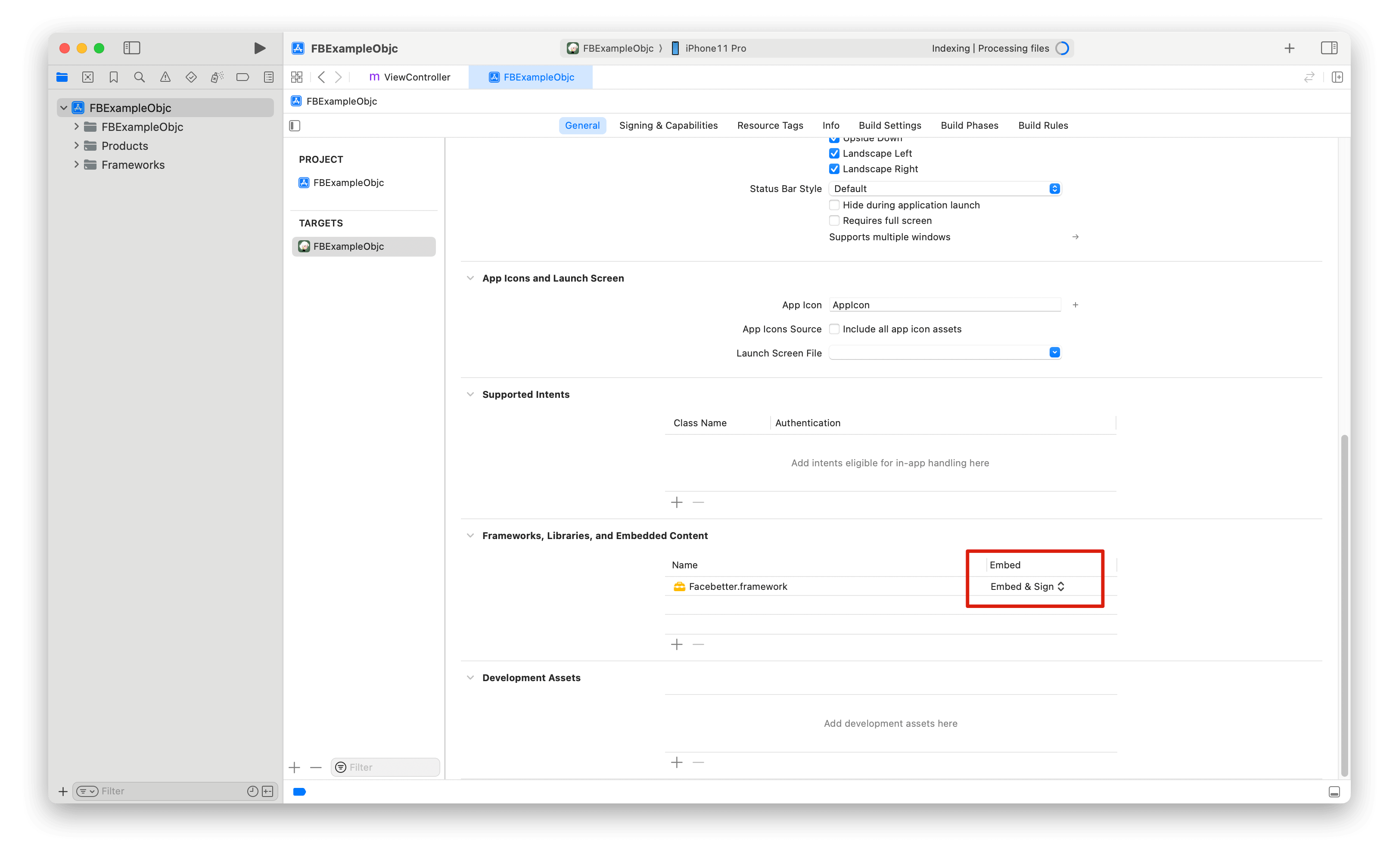
Descarga el SDK desde [Descargas](https://facebetter.net/es/download), copia `Facebetter.framework` al proyecto y [incrusta la biblioteca dinámica](https://help.apple.com/xcode/mac/current/#/dev51a648b07) con **Embed & Sign**.
 ### Permisos
Añade el permiso de cámara en `Info.plist` solo si la app captura desde la cámara:
```xml theme={null}
NSCameraUsageDescription
Se necesita permiso de cámara para fotografías con belleza
```
## Importar
```objc theme={null}
#import
```
## Configuración de logs
El logging está desactivado por defecto. Llama a `setLogConfig:` **antes** de crear el motor.
```objc theme={null}
FBLogConfig *logConfig = [[FBLogConfig alloc] init];
logConfig.level = FBLogLevel_Info;
logConfig.consoleEnabled = YES;
logConfig.fileEnabled = YES;
logConfig.fileName = @"/path/to/facebetter.log";
[FBBeautyEffectEngine setLogConfig:logConfig];
```
## Crear el motor
Vincula el Bundle ID de iOS y luego pasa `licenseToken` o `appId` + `appKey`. Consulta [Obtener AppID y AppKey](/es/intro/enable-service#get-appid-and-appkey) y [Autenticación y licencia](/es/intro/license).
**Prioridad:** si `licenseToken` no está vacío (cadena del token de licencia, JSON `{token}` o contenido de `.lic`), el SDK lo valida en local. En caso contrario usa `appId` + `appKey` contra `/facebetter/v2/auth`.
```objc theme={null}
FBEngineConfig *engineConfig = [[FBEngineConfig alloc] init];
engineConfig.appId = @"your appId";
engineConfig.appKey = @"your appKey";
// engineConfig.licenseToken = @"your license token";
engineConfig.externalContext = NO; // YES only when you own the GL context
self.beautyEffectEngine = [FBBeautyEffectEngine createEngineWithConfig:engineConfig];
if (self.beautyEffectEngine == nil) {
NSLog(@"Failed to create beauty engine");
return;
}
```
`createEngineWithConfig:` devuelve una **instancia**, no un singleton.
## Belleza de piel
La intensidad suele ser `[0.0, 1.0]`. Enumeraciones de estilo: [Enumeraciones de parámetros](/es/intro/makeup).
```objc theme={null}
[self.beautyEffectEngine setSmoothing:0.5f];
[self.beautyEffectEngine setSmoothingStyle:FBSmoothingStyle_Natural];
[self.beautyEffectEngine setWhitening:0.3f];
[self.beautyEffectEngine setWhiteningStyle:FBWhiteningStyle_ColdWhite];
[self.beautyEffectEngine setSharpening:0.2f];
[self.beautyEffectEngine setRosiness:0.15f];
```
### Solo piel
Cuando está activado, suavizado / blanqueamiento / rubor se aplican solo a la piel detectada.
```objc theme={null}
[self.beautyEffectEngine setBeautySkinOnly:YES];
```
## Remodelado facial
El rango de `setReshape:intensity:` es **`[-1.0, 1.0]`**. `0` desactiva. Parámetros: `FBReshape_FaceThin` … `FBReshape_BrowThickness` (`0`–`25`). Significados: [Enumeraciones de parámetros](/es/intro/makeup).
```objc theme={null}
[self.beautyEffectEngine setReshape:FBReshape_FaceThin intensity:0.4f];
[self.beautyEffectEngine setReshape:FBReshape_EyeSize intensity:0.2f];
```
## Remodelado corporal
El rango de `setBodyReshape:intensity:` es **`[0.0, 1.0]`**. `0` desactiva. Registra `resource_body.fbd` con `addResourcePack:` primero. Parámetros: `FBBodyReshape_BodySlim` … `FBBodyReshape_TorsoLong` (`0`–`8`). Consulta [Enumeraciones de parámetros](/es/intro/makeup) y [Paquetes de recursos opcionales](/es/intro/resource-packs).
```objc theme={null}
NSString *bodyPack = [[NSBundle mainBundle] pathForResource:@"resource_body" ofType:@"fbd"];
[self.beautyEffectEngine addResourcePack:bodyPack];
[self.beautyEffectEngine setBodyReshape:FBBodyReshape_WaistSlim intensity:0.4f];
[self.beautyEffectEngine setBodyReshape:FBBodyReshape_LegStretch intensity:0.3f];
[self.beautyEffectEngine setBodyReshape:FBBodyReshape_TorsoLong intensity:0.3f];
```
## Maquillaje
Intensidad, forma y color son llamadas separadas. Estilos completos: [Enumeraciones de parámetros](/es/intro/makeup).
```objc theme={null}
[self.beautyEffectEngine setLipstick:0.5f];
[self.beautyEffectEngine setLipstickColor:FBLipstickColor_Rouge];
[self.beautyEffectEngine setBlush:0.4f];
[self.beautyEffectEngine setBlushStyle:FBBlushStyle_SunKissed];
[self.beautyEffectEngine setBlushColor:FBBlushColor_CoralPink];
[self.beautyEffectEngine setContour:0.35f];
[self.beautyEffectEngine setContourStyle:FBContourStyle_Natural];
[self.beautyEffectEngine setEyeShadow:0.4f];
[self.beautyEffectEngine setEyeShadowStyle:FBEyeShadowStyle_Soft];
[self.beautyEffectEngine setEyeShadowColor:FBEyeShadowColor_Plum];
[self.beautyEffectEngine setEyeLiner:0.4f];
[self.beautyEffectEngine setEyeLinerStyle:FBEyeLinerStyle_Classic];
[self.beautyEffectEngine setEyeLinerColor:FBEyeLinerColor_Coffee];
[self.beautyEffectEngine setEyebrow:0.4f];
[self.beautyEffectEngine setEyebrowStyle:FBEyebrowStyle_Natural];
[self.beautyEffectEngine setEyebrowColor:FBEyebrowColor_DarkBrown];
[self.beautyEffectEngine setEyelash:0.4f];
[self.beautyEffectEngine setEyelashStyle:FBEyelashStyle_Classic];
[self.beautyEffectEngine setEyelashColor:FBEyelashColor_Black];
[self.beautyEffectEngine setPupil:0.4f];
[self.beautyEffectEngine setPupilColor:FBPupilColor_Hazel];
```
## Fondo virtual
La máscara predeterminada es segmentación de retrato. Intensidad de desenfoque `[0.0, 1.0]`; `0` borra el desenfoque. La ruta de imagen debe ser un png/jpg no vacío.
```objc theme={null}
[self.beautyEffectEngine setVirtualBackgroundBlur:0.6f];
[self.beautyEffectEngine setVirtualBackground:imagePath];
[self.beautyEffectEngine setVirtualBackgroundWithData:pngOrJpegData];
[self.beautyEffectEngine clearVirtualBackground];
```
### Croma
El croma solo sustituye la máscara. El relleno sigue siendo desenfoque o imagen de reemplazo.
```objc theme={null}
[self.beautyEffectEngine setChromaKey:FBChromaKeyColor_Green];
[self.beautyEffectEngine setChromaKeySimilarity:0.4f];
[self.beautyEffectEngine setChromaKeySmoothness:0.3f];
[self.beautyEffectEngine setChromaKeyDesaturation:0.2f];
[self.beautyEffectEngine clearChromaKey]; // back to portrait segmentation
```
## Filtros y stickers
Pasa una ruta de archivo `.fbd` o bytes en memoria.
```objc theme={null}
NSString *filterPath = [[NSBundle mainBundle] pathForResource:@"chuxin" ofType:@"fbd"];
[self.beautyEffectEngine setFilter:filterPath];
[self.beautyEffectEngine setFilterIntensity:0.8f];
[self.beautyEffectEngine clearFilter];
NSData *filterData = [NSData dataWithContentsOfFile:filterPath];
[self.beautyEffectEngine setFilterWithData:filterData];
NSString *stickerPath = [[NSBundle mainBundle] pathForResource:@"cherry" ofType:@"fbd"];
[self.beautyEffectEngine setSticker:stickerPath];
[self.beautyEffectEngine clearSticker];
[self.beautyEffectEngine setStickerWithData:stickerData];
```
Los stickers 3D necesitan el paquete opcional `resource_3d.fbd` (no está en el framework). Consulta [Paquetes de recursos opcionales](/es/intro/resource-packs):
```objc theme={null}
NSString *packPath = [[NSBundle mainBundle] pathForResource:@"resource_3d" ofType:@"fbd"];
[self.beautyEffectEngine addResourcePack:packPath];
NSString *sticker3dPath = [[NSBundle mainBundle] pathForResource:@"oculos" ofType:@"fbd"];
[self.beautyEffectEngine set3DSticker:sticker3dPath];
[self.beautyEffectEngine clear3DSticker];
```
## Callbacks y estadísticas
```objc theme={null}
FBEngineCallbacks *callbacks = [[FBEngineCallbacks alloc] init];
__weak typeof(self) weakSelf = self;
callbacks.onEngineEvent = ^(FBEngineEventCode code, NSString * _Nullable message) {
// 0 license OK, 1 license failed, 100 init complete, 101 init failed
NSLog(@"engine event %ld %@", (long)code, message);
};
callbacks.onFaceLandmarks = ^(NSArray * _Nullable results) {
for (FBFaceDetectionResult *face in results) {
NSLog(@"face %d keypoints %lu", face.faceId, (unsigned long)face.keyPoints.count);
}
};
[self.beautyEffectEngine setCallbacks:callbacks];
FBEngineStats *stats = [self.beautyEffectEngine getStats];
NSLog(@"fps=%.1f avg=%.2fms session=%.1fs",
stats.fps, stats.avgProcessTimeMs, stats.sessionTimeS);
```
## Procesar imágenes
`FBImageFrame` admite I420, NV12, NV21, RGB, RGBA, BGR, BGRA, archivo, textura y `UIImage`.
```objc theme={null}
FBImageFrame *fromFile = [FBImageFrame createWithFile:@"/path/photo.png"];
FBImageFrame *fromRGBA = [FBImageFrame createWithRGBA:data width:width height:height stride:stride];
FBImageFrame *fromUIImage = [FBImageFrame createWithUIImage:uiImage];
```
Configura primero `type` y luego llama a `processImage:` (no hay un argumento de modo extra). El formato de salida coincide con el de entrada.
```objc theme={null}
input.type = FBFrameTypeVideo; // o FBFrameTypeImage
FBImageFrame *output = [self.beautyEffectEngine processImage:input];
```
`FBFrameTypeVideo` es para flujos en tiempo real; `FBFrameTypeImage` para estáticos.
Rotar / espejo / convertir / guardar:
```objc theme={null}
[input rotate:FBImageRotation90];
[input setMirror:@"horizontal"]; // applied inside processImage:
FBImageFrame *rgba = [output convert:FBImageFormatRGBA];
const uint8_t *bytes = [rgba data];
[output toFile:@"/path/out.jpg" quality:90];
```
Planos YUV: `dataY`, `dataU`, `dataV`, `dataUV` y `strideY` / `strideU` / `strideV` / `strideUV`.
## Textura externa
Crea el motor en el hilo OpenGL ES y configura `externalContext = YES`. Las texturas de entrada y salida deben compartir ese contexto.
```objc theme={null}
FBEngineConfig *config = [[FBEngineConfig alloc] init];
config.appId = @"your appId";
config.appKey = @"your appKey";
config.externalContext = YES;
self.engine = [FBBeautyEffectEngine createEngineWithConfig:config];
FBImageFrame *inputFrame = [FBImageFrame createWithTexture:textureId
width:width
height:height
stride:width * 4];
inputFrame.type = FBFrameTypeVideo;
FBImageFrame *outputFrame = [self.engine processImage:inputFrame];
GLuint outputTexture = [outputFrame texture];
```
Parámetros de textura recomendados: `GL_LINEAR`, `GL_CLAMP_TO_EDGE`. El motor no elimina tu textura de entrada. La textura de salida la posee el SDK.
Para TRTC / Agora / LiveKit: [Integración con terceros](/es/ios/third-party-integration).
## Ciclo de vida
Mantén el motor con una referencia strong durante la sesión. Ponlo a `nil` cuando se destruya el ViewController. Al salir de la página, detén la captura para dejar de llamar a `processImage:`.
```objc theme={null}
- (void)dealloc {
self.beautyEffectEngine = nil;
}
```
## Relacionado
* [Integración con terceros](/es/ios/third-party-integration)
* [Prácticas recomendadas](/es/ios/best-practices)
* [Manejo de errores](/es/ios/error-handling)
* [Preguntas frecuentes](/es/ios/faq)
* [Referencia de la API](/es/ios/api-reference)
### Permisos
Añade el permiso de cámara en `Info.plist` solo si la app captura desde la cámara:
```xml theme={null}
NSCameraUsageDescription
Se necesita permiso de cámara para fotografías con belleza
```
## Importar
```objc theme={null}
#import
```
## Configuración de logs
El logging está desactivado por defecto. Llama a `setLogConfig:` **antes** de crear el motor.
```objc theme={null}
FBLogConfig *logConfig = [[FBLogConfig alloc] init];
logConfig.level = FBLogLevel_Info;
logConfig.consoleEnabled = YES;
logConfig.fileEnabled = YES;
logConfig.fileName = @"/path/to/facebetter.log";
[FBBeautyEffectEngine setLogConfig:logConfig];
```
## Crear el motor
Vincula el Bundle ID de iOS y luego pasa `licenseToken` o `appId` + `appKey`. Consulta [Obtener AppID y AppKey](/es/intro/enable-service#get-appid-and-appkey) y [Autenticación y licencia](/es/intro/license).
**Prioridad:** si `licenseToken` no está vacío (cadena del token de licencia, JSON `{token}` o contenido de `.lic`), el SDK lo valida en local. En caso contrario usa `appId` + `appKey` contra `/facebetter/v2/auth`.
```objc theme={null}
FBEngineConfig *engineConfig = [[FBEngineConfig alloc] init];
engineConfig.appId = @"your appId";
engineConfig.appKey = @"your appKey";
// engineConfig.licenseToken = @"your license token";
engineConfig.externalContext = NO; // YES only when you own the GL context
self.beautyEffectEngine = [FBBeautyEffectEngine createEngineWithConfig:engineConfig];
if (self.beautyEffectEngine == nil) {
NSLog(@"Failed to create beauty engine");
return;
}
```
`createEngineWithConfig:` devuelve una **instancia**, no un singleton.
## Belleza de piel
La intensidad suele ser `[0.0, 1.0]`. Enumeraciones de estilo: [Enumeraciones de parámetros](/es/intro/makeup).
```objc theme={null}
[self.beautyEffectEngine setSmoothing:0.5f];
[self.beautyEffectEngine setSmoothingStyle:FBSmoothingStyle_Natural];
[self.beautyEffectEngine setWhitening:0.3f];
[self.beautyEffectEngine setWhiteningStyle:FBWhiteningStyle_ColdWhite];
[self.beautyEffectEngine setSharpening:0.2f];
[self.beautyEffectEngine setRosiness:0.15f];
```
### Solo piel
Cuando está activado, suavizado / blanqueamiento / rubor se aplican solo a la piel detectada.
```objc theme={null}
[self.beautyEffectEngine setBeautySkinOnly:YES];
```
## Remodelado facial
El rango de `setReshape:intensity:` es **`[-1.0, 1.0]`**. `0` desactiva. Parámetros: `FBReshape_FaceThin` … `FBReshape_BrowThickness` (`0`–`25`). Significados: [Enumeraciones de parámetros](/es/intro/makeup).
```objc theme={null}
[self.beautyEffectEngine setReshape:FBReshape_FaceThin intensity:0.4f];
[self.beautyEffectEngine setReshape:FBReshape_EyeSize intensity:0.2f];
```
## Remodelado corporal
El rango de `setBodyReshape:intensity:` es **`[0.0, 1.0]`**. `0` desactiva. Registra `resource_body.fbd` con `addResourcePack:` primero. Parámetros: `FBBodyReshape_BodySlim` … `FBBodyReshape_TorsoLong` (`0`–`8`). Consulta [Enumeraciones de parámetros](/es/intro/makeup) y [Paquetes de recursos opcionales](/es/intro/resource-packs).
```objc theme={null}
NSString *bodyPack = [[NSBundle mainBundle] pathForResource:@"resource_body" ofType:@"fbd"];
[self.beautyEffectEngine addResourcePack:bodyPack];
[self.beautyEffectEngine setBodyReshape:FBBodyReshape_WaistSlim intensity:0.4f];
[self.beautyEffectEngine setBodyReshape:FBBodyReshape_LegStretch intensity:0.3f];
[self.beautyEffectEngine setBodyReshape:FBBodyReshape_TorsoLong intensity:0.3f];
```
## Maquillaje
Intensidad, forma y color son llamadas separadas. Estilos completos: [Enumeraciones de parámetros](/es/intro/makeup).
```objc theme={null}
[self.beautyEffectEngine setLipstick:0.5f];
[self.beautyEffectEngine setLipstickColor:FBLipstickColor_Rouge];
[self.beautyEffectEngine setBlush:0.4f];
[self.beautyEffectEngine setBlushStyle:FBBlushStyle_SunKissed];
[self.beautyEffectEngine setBlushColor:FBBlushColor_CoralPink];
[self.beautyEffectEngine setContour:0.35f];
[self.beautyEffectEngine setContourStyle:FBContourStyle_Natural];
[self.beautyEffectEngine setEyeShadow:0.4f];
[self.beautyEffectEngine setEyeShadowStyle:FBEyeShadowStyle_Soft];
[self.beautyEffectEngine setEyeShadowColor:FBEyeShadowColor_Plum];
[self.beautyEffectEngine setEyeLiner:0.4f];
[self.beautyEffectEngine setEyeLinerStyle:FBEyeLinerStyle_Classic];
[self.beautyEffectEngine setEyeLinerColor:FBEyeLinerColor_Coffee];
[self.beautyEffectEngine setEyebrow:0.4f];
[self.beautyEffectEngine setEyebrowStyle:FBEyebrowStyle_Natural];
[self.beautyEffectEngine setEyebrowColor:FBEyebrowColor_DarkBrown];
[self.beautyEffectEngine setEyelash:0.4f];
[self.beautyEffectEngine setEyelashStyle:FBEyelashStyle_Classic];
[self.beautyEffectEngine setEyelashColor:FBEyelashColor_Black];
[self.beautyEffectEngine setPupil:0.4f];
[self.beautyEffectEngine setPupilColor:FBPupilColor_Hazel];
```
## Fondo virtual
La máscara predeterminada es segmentación de retrato. Intensidad de desenfoque `[0.0, 1.0]`; `0` borra el desenfoque. La ruta de imagen debe ser un png/jpg no vacío.
```objc theme={null}
[self.beautyEffectEngine setVirtualBackgroundBlur:0.6f];
[self.beautyEffectEngine setVirtualBackground:imagePath];
[self.beautyEffectEngine setVirtualBackgroundWithData:pngOrJpegData];
[self.beautyEffectEngine clearVirtualBackground];
```
### Croma
El croma solo sustituye la máscara. El relleno sigue siendo desenfoque o imagen de reemplazo.
```objc theme={null}
[self.beautyEffectEngine setChromaKey:FBChromaKeyColor_Green];
[self.beautyEffectEngine setChromaKeySimilarity:0.4f];
[self.beautyEffectEngine setChromaKeySmoothness:0.3f];
[self.beautyEffectEngine setChromaKeyDesaturation:0.2f];
[self.beautyEffectEngine clearChromaKey]; // back to portrait segmentation
```
## Filtros y stickers
Pasa una ruta de archivo `.fbd` o bytes en memoria.
```objc theme={null}
NSString *filterPath = [[NSBundle mainBundle] pathForResource:@"chuxin" ofType:@"fbd"];
[self.beautyEffectEngine setFilter:filterPath];
[self.beautyEffectEngine setFilterIntensity:0.8f];
[self.beautyEffectEngine clearFilter];
NSData *filterData = [NSData dataWithContentsOfFile:filterPath];
[self.beautyEffectEngine setFilterWithData:filterData];
NSString *stickerPath = [[NSBundle mainBundle] pathForResource:@"cherry" ofType:@"fbd"];
[self.beautyEffectEngine setSticker:stickerPath];
[self.beautyEffectEngine clearSticker];
[self.beautyEffectEngine setStickerWithData:stickerData];
```
Los stickers 3D necesitan el paquete opcional `resource_3d.fbd` (no está en el framework). Consulta [Paquetes de recursos opcionales](/es/intro/resource-packs):
```objc theme={null}
NSString *packPath = [[NSBundle mainBundle] pathForResource:@"resource_3d" ofType:@"fbd"];
[self.beautyEffectEngine addResourcePack:packPath];
NSString *sticker3dPath = [[NSBundle mainBundle] pathForResource:@"oculos" ofType:@"fbd"];
[self.beautyEffectEngine set3DSticker:sticker3dPath];
[self.beautyEffectEngine clear3DSticker];
```
## Callbacks y estadísticas
```objc theme={null}
FBEngineCallbacks *callbacks = [[FBEngineCallbacks alloc] init];
__weak typeof(self) weakSelf = self;
callbacks.onEngineEvent = ^(FBEngineEventCode code, NSString * _Nullable message) {
// 0 license OK, 1 license failed, 100 init complete, 101 init failed
NSLog(@"engine event %ld %@", (long)code, message);
};
callbacks.onFaceLandmarks = ^(NSArray * _Nullable results) {
for (FBFaceDetectionResult *face in results) {
NSLog(@"face %d keypoints %lu", face.faceId, (unsigned long)face.keyPoints.count);
}
};
[self.beautyEffectEngine setCallbacks:callbacks];
FBEngineStats *stats = [self.beautyEffectEngine getStats];
NSLog(@"fps=%.1f avg=%.2fms session=%.1fs",
stats.fps, stats.avgProcessTimeMs, stats.sessionTimeS);
```
## Procesar imágenes
`FBImageFrame` admite I420, NV12, NV21, RGB, RGBA, BGR, BGRA, archivo, textura y `UIImage`.
```objc theme={null}
FBImageFrame *fromFile = [FBImageFrame createWithFile:@"/path/photo.png"];
FBImageFrame *fromRGBA = [FBImageFrame createWithRGBA:data width:width height:height stride:stride];
FBImageFrame *fromUIImage = [FBImageFrame createWithUIImage:uiImage];
```
Configura primero `type` y luego llama a `processImage:` (no hay un argumento de modo extra). El formato de salida coincide con el de entrada.
```objc theme={null}
input.type = FBFrameTypeVideo; // o FBFrameTypeImage
FBImageFrame *output = [self.beautyEffectEngine processImage:input];
```
`FBFrameTypeVideo` es para flujos en tiempo real; `FBFrameTypeImage` para estáticos.
Rotar / espejo / convertir / guardar:
```objc theme={null}
[input rotate:FBImageRotation90];
[input setMirror:@"horizontal"]; // applied inside processImage:
FBImageFrame *rgba = [output convert:FBImageFormatRGBA];
const uint8_t *bytes = [rgba data];
[output toFile:@"/path/out.jpg" quality:90];
```
Planos YUV: `dataY`, `dataU`, `dataV`, `dataUV` y `strideY` / `strideU` / `strideV` / `strideUV`.
## Textura externa
Crea el motor en el hilo OpenGL ES y configura `externalContext = YES`. Las texturas de entrada y salida deben compartir ese contexto.
```objc theme={null}
FBEngineConfig *config = [[FBEngineConfig alloc] init];
config.appId = @"your appId";
config.appKey = @"your appKey";
config.externalContext = YES;
self.engine = [FBBeautyEffectEngine createEngineWithConfig:config];
FBImageFrame *inputFrame = [FBImageFrame createWithTexture:textureId
width:width
height:height
stride:width * 4];
inputFrame.type = FBFrameTypeVideo;
FBImageFrame *outputFrame = [self.engine processImage:inputFrame];
GLuint outputTexture = [outputFrame texture];
```
Parámetros de textura recomendados: `GL_LINEAR`, `GL_CLAMP_TO_EDGE`. El motor no elimina tu textura de entrada. La textura de salida la posee el SDK.
Para TRTC / Agora / LiveKit: [Integración con terceros](/es/ios/third-party-integration).
## Ciclo de vida
Mantén el motor con una referencia strong durante la sesión. Ponlo a `nil` cuando se destruya el ViewController. Al salir de la página, detén la captura para dejar de llamar a `processImage:`.
```objc theme={null}
- (void)dealloc {
self.beautyEffectEngine = nil;
}
```
## Relacionado
* [Integración con terceros](/es/ios/third-party-integration)
* [Prácticas recomendadas](/es/ios/best-practices)
* [Manejo de errores](/es/ios/error-handling)
* [Preguntas frecuentes](/es/ios/faq)
* [Referencia de la API](/es/ios/api-reference)